How To Clean Ninja Professional Blender Base: Easy Steps Guide
Keeping your Ninja Professional Blender in top shape means more than just cleaning the pitcher and blades—it also means caring for the base. Many users overlook the blender base, but this part holds the motor and controls, and it can quickly collect dust, spills, and sticky build-up. If left dirty, these issues can affect your blender’s performance and even shorten its life. The good news? Cleaning the Ninja Professional Blender base is straightforward if you know what to do and what to avoid. This guide walks you through every step, using simple English and clear instructions. By the end, you’ll know not just how to clean, but how to keep your blender base working smoothly for years.
Why Cleaning The Ninja Blender Base Matters
The blender base is the heart of your machine. It contains the motor, control buttons, and electronic circuits. If food or liquid gets inside, it can cause bad smells, sticky buttons, or even electrical problems. Dust and food particles can also make the cooling fans work harder, which may lead to overheating.
Many people focus only on the pitcher or the blade assembly. However, ignoring the base is a mistake. For example, a 2026 survey by Consumer Reports found that nearly 40% of blender breakdowns started with problems in the base, often related to stuck buttons or internal moisture. That’s why regular cleaning is important—not just for hygiene, but also for the life of your blender.
Safety First: What To Know Before Cleaning
Before you start, remember that the Ninja Professional Blender base is not waterproof. Never put it in the dishwasher, never soak it, and never rinse it under running water. The motor can be ruined even by small amounts of water inside.
Always unplug your blender before cleaning. This is not just for safety, but also to protect the circuits from accidental button presses or static electricity. Wait at least a few minutes after use to allow the motor to cool down.
Cleaning a hot base can damage the parts and be risky for you.
What You’ll Need
Gather your cleaning supplies before you begin. Here are the basics:
- Soft, damp cloth (microfiber is best)
- Small brush (old toothbrush or paintbrush)
- Cotton swabs
- Mild dish soap
- Baking soda (optional, for tough stains)
- Dry towel
- Compressed air canister (optional, for vents)
- Toothpick (for tiny crevices)
Make sure all cleaning supplies are clean themselves. Dirty rags or brushes can introduce new grime or scratch the surface.
Quick Overview: Cleaning Steps Compared
Below is a simple comparison of the main cleaning steps, their time, and their importance.
| Step | Time Needed | Importance |
|---|---|---|
| Unplug and cool | 1 minute | Essential for safety |
| Wipe exterior | 3-5 minutes | Removes dust and spills |
| Clean buttons and crevices | 2-3 minutes | Prevents sticking |
| Clear vents | 1-2 minutes | Prevents overheating |
| Dry thoroughly | 2 minutes | Protects electronics |

Credit: www.amazon.com
Step-by-step Guide To Cleaning The Ninja Professional Blender Base
Let’s break down each part of the cleaning process so you get the best results with the least risk.
1. Unplug And Prepare
- Always unplug the blender from the wall. This should be your very first step.
- Move the base to a stable surface with good lighting. If you need to clean near the sink, keep the base away from running water.
- If you just used the blender, let it cool for at least 10 minutes.
2. Wipe Down The Exterior
- Dampen a soft cloth with warm water. Wring it out so it’s not dripping wet.
- Add a drop of mild dish soap if there are sticky spots.
- Wipe the outside of the base, paying close attention to the area under the pitcher, where liquid often drips.
- For the display panel and buttons, avoid pressing too hard. Use gentle, circular motions.
- Rinse the cloth out, wring it again, and wipe off any soap residue.
- Dry with a clean towel.
Non-obvious tip: If you see oily residue, a small amount of diluted vinegar can help. But never pour vinegar or any cleaner directly on the base.
3. Detail The Buttons And Crevices
- Use a cotton swab dampened with a little water to clean around the buttons.
- For narrow cracks or seams, a toothpick or a small brush works well.
- Gently brush out any crumbs or dried food from around the controls.
- If buttons are sticky, mix a drop of dish soap with water, dip a cotton swab, and wipe gently.
- Avoid using sharp objects that could scratch the plastic.
Extra insight: Some Ninja bases have a thin rubber seal around the buttons. Go slowly here; don’t pull at the seal, as it can tear or loosen.
4. Clean The Air Vents
Air vents are often ignored, but they are crucial for the motor’s health.
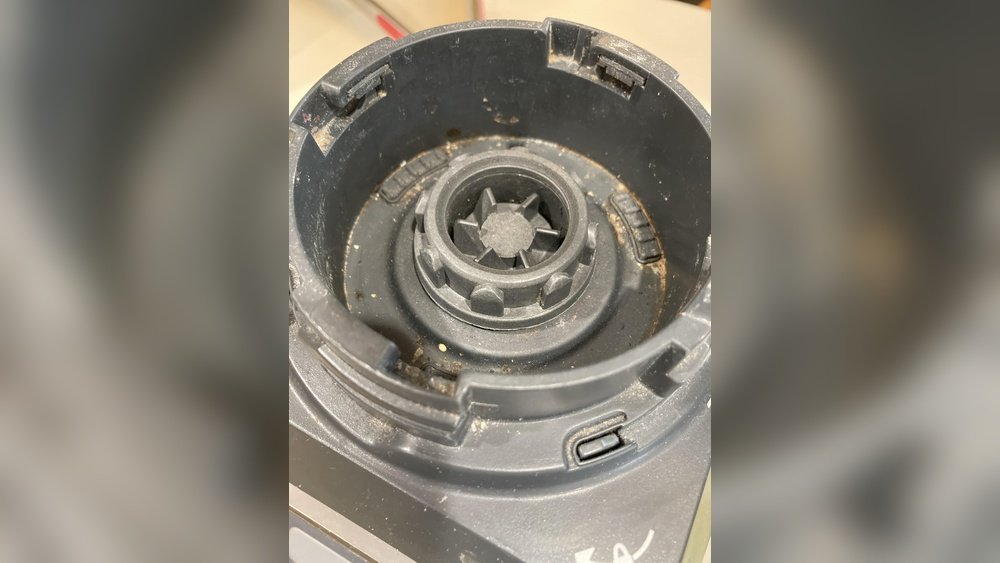
- Find the air intake and exhaust vents (usually on the bottom or sides).
- Blow away dust using a can of compressed air. If you don’t have this, a dry brush or a quick puff of breath can help.
- Never poke inside the vents with sharp items.
- If grease or sticky dust is present, use a barely damp cotton swab to gently lift it away.
Important: If the vents are blocked, your blender can overheat. Regular vent cleaning can prevent sudden shut-offs or burning smells.
5. Remove Stubborn Stains And Build-up
If you notice stains that won’t wipe away:
- Make a paste with baking soda and a few drops of water.
- Apply the paste to the stain using a soft cloth, not your fingers.
- Rub gently. Let it sit for 2-3 minutes.
- Wipe off with a damp cloth, then dry.
Beginner mistake: Scrubbing hard can damage labels, paint, or the plastic surface. Always test in a small, hidden area first.
6. Dry Completely
- Use a dry, lint-free towel to wipe all surfaces.
- Let the base air dry for 10-15 minutes before plugging it in.
- Make sure no moisture remains around the power cord or vents.
Extra insight: Even a small amount of water inside the base can cause long-term damage. Patience here pays off.
Common Problems And How To Fix Them
Sometimes, cleaning reveals deeper issues. Here’s a quick guide to what you might find and what to do.
| Problem | Possible Cause | What to Do |
|---|---|---|
| Buttons stick or don’t work | Dried spills inside buttons | Clean with cotton swab and mild soap |
| Bad smell from base | Food or liquid inside vents | Clean vents, let air dry, avoid use until dry |
| Base feels hot | Dust in air vents or overuse | Clean vents, let motor rest |
| White spots on surface | Hard water stains or cleaning product residue | Wipe with diluted vinegar, then dry |
If you see smoke, hear strange noises, or the blender will not power on after drying and cleaning, stop using it and contact Ninja customer support.
What Not To Do: Avoiding Costly Mistakes
Many users accidentally damage their Ninja blender base by making the following mistakes:
- Never immerse the base in water. Even a quick dip can ruin the motor.
- Don’t use harsh chemicals like bleach, ammonia, or oven cleaner. These can damage plastic and electronics.
- Never spray cleaner directly onto the base. Spray on a cloth first.
- Don’t use abrasive pads—they scratch the finish and can remove the markings on the control panel.
- Avoid plugging in while wet. Wait until you’re absolutely sure the base is dry.
Ignoring these tips can void your warranty and lead to costly repairs.
How Often Should You Clean The Blender Base?
- Light cleaning: Wipe the base after every use, especially if you notice splashes or spills.
- Deep cleaning: Clean buttons, crevices, and vents at least once a week if you use the blender daily.
- Monthly: Give the base a more detailed cleaning, including vent dust removal and inspecting for stains.
Tip: Set a reminder on your phone or calendar. Regular cleaning takes only a few minutes and can save you hundreds of dollars in repairs or replacement.

Credit: www.ifixit.com
Extra Tips For A Cleaner, Longer-lasting Blender
- Use a splash guard: If your blender model supports one, it can reduce spills near the base.
- Keep the base on a non-slip mat: This makes cleaning easier and protects your countertop.
- Store with a cover: A simple kitchen towel or cloth over the base keeps dust away if you don’t use the blender every day.
- Check the cord: Wipe the power cord regularly. Food residue here can travel into the base and cause short circuits.
When To Call For Professional Help
Sometimes, home cleaning isn’t enough. If you notice:
- Persistent burning smells
- Liquid inside the base (visible through vents)
- Unusual noises or vibrations
- Blender not turning on after cleaning
…it’s time to contact Ninja customer service or a qualified appliance repair shop. Attempting to open the base yourself can void your warranty and may be unsafe.
The official Ninja website offers support and troubleshooting guides. For major issues, you can visit Ninja Kitchen Support for more information.
How The Ninja Professional Blender Base Compares To Others
If you’re wondering how the Ninja base stacks up against other popular blender brands in terms of cleaning and maintenance, here’s a quick overview:
| Blender Brand | Base Cleaning Difficulty | Common Issues |
|---|---|---|
| Ninja Professional | Easy | Sticky buttons, vent dust |
| Vitamix | Medium | Grease build-up, heavy base |
| Oster | Easy | Cracked plastic, stains |
| NutriBullet | Easy | Liquid leaks, stuck buttons |
Insight: Ninja Professional bases are praised for their simple design and easy-to-clean surfaces. However, all blenders benefit from the same careful approach outlined in this guide.
How To Prevent Messes In The First Place
A clean base starts with good habits:
- Don’t overfill the pitcher. This prevents overflow that can drip onto the base.
- Check the lid seal before blending—loose lids are a major cause of spills.
- Wipe spills immediately. Dried-on liquids are much harder to remove.
- Blend on a stable surface. This reduces vibration and accidental tipping.
Pro tip: Pour liquids into the pitcher with the base moved away, then set it on the base. This keeps the base dry even if you spill.
The Role Of Regular Maintenance
Many people only clean the base when something goes wrong. But regular, light maintenance is actually easier and more effective:
- Wipe down after each use: Takes less than a minute, stops build-up.
- Inspect weekly: Check for loose buttons, stains, or dust in vents.
- Schedule deep cleanings: Once a month, even if the base looks clean.
With this routine, you’ll rarely need to do heavy scrubbing or call for repairs.
How To Store Your Ninja Blender Base
Proper storage can keep your base cleaner and safer:
- Keep it upright—never store on its side or upside down.
- Don’t wrap the cord tightly around the base, as this can stress the cord and plug.
- Avoid humid areas, like above the dishwasher or near a stove.
- Use a cover if storing for long periods.
These steps prevent dust, moisture, and accidental bumps from damaging the base.

Credit: www.youtube.com
How To Clean After A Major Spill
If you spill a lot of liquid (like a smoothie or soup) onto the base:
- Unplug immediately.
- Blot up as much as possible with paper towels—don’t rub, as this spreads the mess.
- Tilt the base slightly to let any liquid drain away from the motor area.
- Use a dry brush and cloth to remove remaining liquid and residue.
- Let the base air dry for 24 hours before plugging in.
- Do not use a hair dryer or heater, as this can damage the electronics.
If the blender does not work after this, contact support.
Eco-friendly Cleaning Tips
Care about the environment? Here are some ways to clean your blender base without harsh chemicals:
- Use baking soda and vinegar for tough stains—both are safe and biodegradable.
- Try microfiber cloths—they clean well with just water.
- Avoid disposable wipes—reusable cloths are better for the planet.
These options are safe for your blender and your family.
Frequently Asked Questions
How Often Should I Clean The Ninja Blender Base?
You should wipe the base after every use and clean crevices and vents at least once a week. For deep cleaning, once a month is best if you use the blender regularly.
Can I Use Disinfectant Wipes On The Blender Base?
Yes, but make sure they are alcohol-free and non-abrasive. Wipe gently and always dry with a towel afterward to remove any residue. Never use bleach wipes.
What If Water Gets Inside The Base?
Immediately unplug the blender and let it dry in a warm, ventilated area for at least 24-48 hours. Do not try to use it until you are sure all moisture is gone. If problems continue, contact Ninja support.
Why Do The Buttons Stick Even After Cleaning?
Sticky buttons often mean liquid or syrup has dried inside the button gaps. Repeat cleaning with a dampened cotton swab and mild soap. If problems persist, professional service may be needed.
Is It Safe To Open The Blender Base For Cleaning?
No. Opening the base yourself can void the warranty and may cause electric shock or further damage. Only trained professionals should open the base.
—
Taking care of your Ninja Professional Blender base is simple with the right steps. Regular cleaning protects your investment, keeps your kitchen safe, and ensures that every smoothie, soup, or sauce is made with a machine that works like new.
With just a few minutes of care each week, you’ll avoid most common problems and get years of reliable blending. If you ever have doubts, check the official support page or contact Ninja directly. Clean machines make for happier kitchens—and better food every time.