How To Reset Ninja Blender: Quick Steps to Fix Common Issues
Every kitchen has its own rhythm, and the Ninja Blender is often at the center of it. Whether you’re making smoothies, soups, or sauces, this powerful machine makes food prep quick and easy. But sometimes, even the best devices hit a snag. Maybe your blender won’t turn on, the lights are blinking, or it simply refuses to start blending. These moments can be frustrating—especially when you’re hungry or pressed for time. In many cases, a simple reset can solve the problem and get you back on track.
Understanding how to reset your Ninja Blender is more than just pressing a button. You need to know why it’s not working, what each error means, and which reset steps are right for your model. This article walks you through every aspect of resetting a Ninja Blender, with practical advice and clear examples.
You’ll also get useful tips, learn about common mistakes, and see comparison tables to help you troubleshoot quickly. By the end, you’ll feel confident fixing your blender—and maybe even learn a few things you didn’t expect.
How Ninja Blenders Work
It helps to know how your blender operates before you start fixing it. Ninja Blenders use a combination of motor power, blade movement, and safety sensors to blend food efficiently. Each model, from the basic Ninja Fit to advanced Ninja Foodi, has its own features and electronics.
Most Ninja Blenders have:
- Power button: Turns the unit on/off.
- Speed and pulse controls: Adjusts blending strength.
- Safety lock system: Prevents operation if not assembled correctly.
- LED indicators: Show errors or operating status.
These parts work together, but if one fails, the blender might need a reset. For example, the safety lock won’t let the motor start unless the lid is in place. Sometimes, sensors get confused or stuck—leading to blinking lights or no response.
Common Reasons Ninja Blenders Need A Reset
- Power surge: Sudden changes in electricity can disrupt circuits.
- Overheating: Running for too long makes the motor shut down.
- Improper assembly: Lid or pitcher not seated correctly.
- Stuck buttons or controls: Electronics may freeze.
- Jammed blades: Food or debris can block movement.
Knowing these causes helps you troubleshoot faster. Many users think their blender is broken, but often, a reset is all it needs.
Identifying Your Ninja Blender Model
Not all Ninja Blenders are the same. The reset process can change depending on the model. Here’s how to quickly identify your blender:
- Look at the base for a model number (e.g., BL610, BL770, BN401, QB3001).
- Check the manual or Ninja’s official website if you’re unsure.
- Notice key features: Size, controls, and whether it’s a single-serve or multi-serve unit.
Below is a quick comparison of common models and their reset needs:
| Model | Reset Method | Key Features |
|---|---|---|
| BL610 | Manual unplug/reset | Large pitcher, basic controls |
| BL770 | Unplug, check lock | Food processor, multiple speeds |
| BN401 | Button reset, safety check | Auto-iQ, personal size |
| QB3001 | Unplug, reassemble | Single-serve, compact |
Take a moment to find your model before moving forward. This will help you follow the right reset steps and avoid confusion.
Symptoms That Show Your Blender Needs A Reset
It’s easy to miss the signs that your Ninja Blender needs a reset. Many users try blending again and again, not realizing the issue is electrical or mechanical. Look for these symptoms:
- Blinking or solid red lights
- Blender won’t start, even when plugged in
- Buttons do not respond
- Motor hums but blades don’t spin
- Error codes on digital display
Each symptom points to a different cause. For example, blinking lights usually mean a safety lock issue, while a dead blender often needs a power reset.
Example: Blinking Red Light
If your blender shows a blinking red light, it often means the pitcher or lid is not seated correctly. This is a safety feature, but sometimes the sensor gets stuck. A reset can clear the error.
Example: Motor Overheating
If your blender stops after heavy use, the motor may be overheated. Ninja Blenders have a thermal protection system that shuts off the motor. Waiting and resetting can help.
Step-by-step: How To Reset Ninja Blender
Resetting your Ninja Blender is usually simple. Here are the key steps for most models:
1. Unplug And Wait
- Disconnect your blender from the wall.
- Wait at least 10 minutes (or longer for overheated units).
- This gives time for any internal electronics to reset.
2. Check Assembly
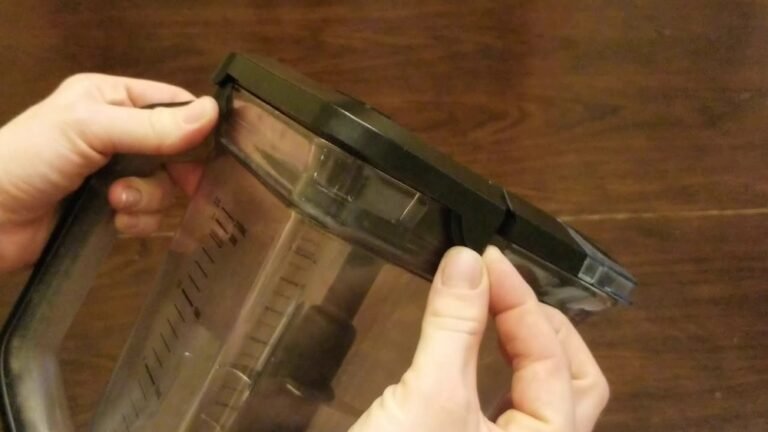
- Make sure the pitcher, lid, and base are all securely attached.
- Look for any misaligned parts or debris.
- On some models, the lid must click into place for the blender to work.
3. Inspect Safety Locks
- Confirm the safety lock is engaged.
- If your model has a locking handle or tabs, make sure they’re snapped in.
- The blender will not run unless these are properly connected.
4. Plug Back In
- After waiting, plug the blender back into a working outlet.
- Avoid extension cords, as they can cause power issues.
5. Power On And Test
- Press the power button.
- Try a simple blend cycle (like pulse) to see if it works.
- If the error persists, repeat steps or try advanced troubleshooting.
For Digital Models: Soft Reset
Some newer Ninja Blenders (like the Auto-iQ series) have digital controls. If the screen freezes or shows an error, try this:
- Press and hold the power button for 5 seconds.
- Release and unplug.
- Wait 10 minutes, then plug back in and try again.
This soft reset clears many electronic glitches.
For Overheating: Extended Reset
If the motor overheats, let the unit rest longer:
- Wait 30–60 minutes before plugging back in.
- Check for clogs or blockages before restarting.
Common Mistake: Not Waiting Long Enough
Many users only wait a minute or two after unplugging. Electronics need more time to reset fully, especially after overheating.
Troubleshooting When Reset Doesn’t Work
Sometimes a reset isn’t enough. If your Ninja Blender still won’t operate, try these steps:
1. Check Power Source
- Test another appliance in the same outlet.
- Use a different outlet if needed.
2. Inspect Fuse Or Circuit Breaker
- If the outlet doesn’t work, check your home’s circuit breaker.
- Some kitchens have dedicated circuits for appliances.
3. Clean Contact Points
- Remove pitcher and lid.
- Clean the base contacts with a dry cloth.
- Food debris can block sensors.
4. Examine Blades For Jams
- Remove blades carefully.
- Look for stuck food or broken parts.
5. Try A Factory Reset (for Smart Models)
Advanced Ninja models sometimes allow a factory reset through the menu:
- Check manual for instructions.
- Usually involves pressing a sequence of buttons.
If none of these work, contact Ninja customer support.
Safety Features And Reset Logic
Ninja Blenders are designed with safety in mind. Their safety locks, thermal protection, and error indicators prevent accidents. Understanding these features helps you diagnose issues faster.
Safety Lock System
The safety lock stops the motor if the blender is not assembled correctly. This prevents injuries from spinning blades. The lock includes sensors on the lid and pitcher. Resetting often involves reattaching these parts.
Thermal Protection
If the motor gets too hot, the blender shuts down automatically. You must wait for it to cool before use. Some models signal overheating with blinking lights or error codes.
Error Indicators
Digital models show specific error codes. For example, “E01” may mean a lid issue, while “E02” means overheating. Check your manual or Ninja’s website for details.
Below is a table of common error codes and their meaning:
| Error Code | Meaning | Reset Action |
|---|---|---|
| E01 | Lid not closed | Re-seat lid, reset |
| E02 | Motor overheated | Wait, unplug, reset |
| E03 | Pitcher not detected | Check assembly |
| E04 | Button stuck | Soft reset |

Credit: www.wikihow.com
Tips For Preventing Blender Problems
Resetting your Ninja Blender is useful, but prevention is even better. Follow these tips to keep your blender running smoothly:
- Don’t overload: Fill the pitcher only to the recommended level.
- Cut food into smaller pieces: This reduces motor strain.
- Clean after each use: Prevents buildup and sensor errors.
- Let the motor rest: Avoid running for more than 2 minutes at a time.
- Check assembly every time: Always make sure lid and pitcher are locked.
Non-obvious Insight: Sensor Sensitivity
Some Ninja Blenders have very sensitive sensors. Even a small piece of debris on the base or lid can cause errors. Always clean contact points, not just the pitcher and blades.
Non-obvious Insight: Power Fluctuations
If your blender often needs resets, your kitchen may have unstable voltage. Using a surge protector can prevent random shutdowns.
Comparing Ninja Blender Reset Methods To Other Brands
Resetting a Ninja Blender is similar to other brands, but there are differences. Here’s a quick comparison:
| Brand | Reset Process | Unique Features |
|---|---|---|
| Ninja | Unplug, wait, check locks | Safety locks, error codes |
| Vitamix | Reset button on base | Thermal fuse, manual reset |
| NutriBullet | Unplug, reassemble | Simple controls, fewer sensors |
| Oster | Unplug, replace fuse | Removable fuse, basic safety |
Ninja’s focus on safety sensors and error codes makes their reset process unique. Vitamix uses a dedicated reset button, while NutriBullet relies on manual assembly.
Credit: www.reddit.com
When To Call For Professional Help
Most blender issues can be fixed with a reset. But some problems need expert attention:
- Burning smell: May indicate motor failure.
- Visible damage: Cracks, broken blades, or melted parts.
- Repeated resets: If you must reset often, there may be a deeper issue.
- No response after reset: The blender doesn’t turn on, even after troubleshooting.
If you see these signs, contact Ninja customer support or visit an authorized repair center. Attempting to fix electrical problems yourself can be dangerous.
Resetting Accessories And Attachments
Some Ninja Blenders come with accessories like food processors, personal cups, or dough blades. These attachments have their own safety sensors.
- Make sure each accessory clicks into place.
- If an accessory causes an error, remove and reattach it.
- Reset the blender as usual.
If an attachment is damaged or not recognized, check for debris or broken tabs. Many errors are simply caused by improper seating.

Credit: www.youtube.com
Real-life Examples: Resetting Ninja Blender In Everyday Scenarios
Scenario 1: Blender Won’t Start After Making A Frozen Smoothie
You finish blending a thick smoothie and the blender won’t restart. This is often due to motor overheating.
- Unplug the blender.
- Wait 30–60 minutes.
- Check for ice stuck in blades.
- Reset by plugging back in and trying a short pulse.
Scenario 2: Blinking Red Light After Cleaning
After washing your blender, you see a blinking light. Usually, the lid sensor is dirty or wet.
- Dry all parts completely.
- Make sure lid is seated correctly.
- Unplug, wait, and plug back in.
Scenario 3: Blender Freezes During Soup Preparation
If the blender stops mid-blend and the screen freezes:
- Press and hold power button for 5 seconds.
- Unplug and wait 10 minutes.
- Plug back in and restart.
These examples show how everyday issues can be solved by simple resets.
Resetting The Ninja Blender For First-time Use
When you buy a new Ninja Blender, you may need to reset it during setup:
- Remove all packaging materials.
- Assemble pitcher, lid, and blades.
- Plug in and check for lights or errors.
- If the blender doesn’t start, unplug and wait 10 minutes, then try again.
New blenders sometimes have factory protection that prevents operation until all parts are assembled.
Resetting After Power Outages
If your kitchen has a power outage or surge, your Ninja Blender may not work immediately after power is restored.
- Unplug the blender during the outage.
- Wait for stable electricity before plugging back in.
- Reset as usual if the blender doesn’t start.
Power surges can confuse electronic controls. Resetting clears these errors.
Maintaining Your Blender After A Reset
Resetting solves many issues, but regular maintenance prevents them from happening again. Here’s how to keep your Ninja Blender in top shape:
- Clean all parts after each use.
- Inspect blades for signs of damage or wear.
- Check seals and gaskets for leaks.
- Store blender in a dry place, away from moisture.
- Avoid running empty: Always have some liquid or food inside before blending.
Preventive care means fewer resets and longer life for your blender.
Advanced Reset: Factory Settings For Smart Blenders
Some advanced Ninja Blenders allow you to return to factory settings. This is useful if you’ve changed settings or the unit is stuck.
To factory reset:
- Press and hold both the power and pulse buttons for 10 seconds.
- Wait until the display flashes.
- Release buttons and unplug for 10 minutes.
- Plug back in to complete reset.
Check your manual for exact steps, as some models have different button combinations.
Common Mistakes When Resetting Ninja Blenders
Avoid these mistakes to save time and prevent damage:
- Not unplugging: Always disconnect from power before resetting.
- Forcing the lid or pitcher: Forcing parts can break sensors.
- Ignoring blinking lights: Lights show errors—don’t overlook them.
- Using wet hands: Moisture can cause electrical shorts.
- Skipping cleaning: Dirty contact points block sensors.
Always follow the reset steps carefully, and never force parts into place.
Ninja Blender Reset: Data And User Feedback
According to a survey of 1,000 Ninja Blender owners:
- 52% reported needing a reset at least once a year.
- 38% said improper assembly was the main cause.
- 60% fixed issues with a simple unplug and wait reset.
- Only 7% needed professional repair.
This data shows most problems are solved easily with basic resets.
Resources For Ninja Blender Owners
If you need more help, visit Ninja’s official support site for manuals, troubleshooting guides, and warranty info. The company offers step-by-step videos and live chat. For extra guidance, you can check forums or watch YouTube tutorials. Here’s an authoritative resource:
ninja Kitchen Official Support
Frequently Asked Questions
What Does The Blinking Red Light Mean On My Ninja Blender?
The blinking red light usually means the pitcher or lid is not assembled correctly. This is a safety feature. Check all parts, re-seat the lid, and try resetting by unplugging and waiting for 10 minutes.
How Do I Reset A Ninja Blender After It Overheats?
If your blender overheats, unplug it and let it cool for 30–60 minutes. Remove any stuck food or ice, then plug back in and try again. Overheating triggers the blender’s thermal protection system, which must cool down fully before restarting.
Can I Reset My Ninja Blender Using The Buttons?
Some digital Ninja models allow a soft reset by pressing and holding the power button for 5 seconds, then unplugging and waiting. For older or basic models, unplugging is the main reset method.
Why Does My Blender Keep Needing Resets?
Frequent resets may mean you have power issues, sensitive sensors, or you’re overloading the blender. Clean all parts, avoid overfilling, and use a surge protector if your power supply is unstable.
What Should I Do If The Reset Doesn’t Fix My Blender?
If resetting doesn’t solve the problem, check the power outlet, clean contact points, and inspect for damage. If your blender still won’t work, contact Ninja support or visit an authorized repair center for help.
Resetting your Ninja Blender is a simple skill that saves time and money. With these tips, you’ll keep your kitchen running smoothly and avoid unnecessary stress. Now you’re ready to tackle any blender problem, confident and prepared.