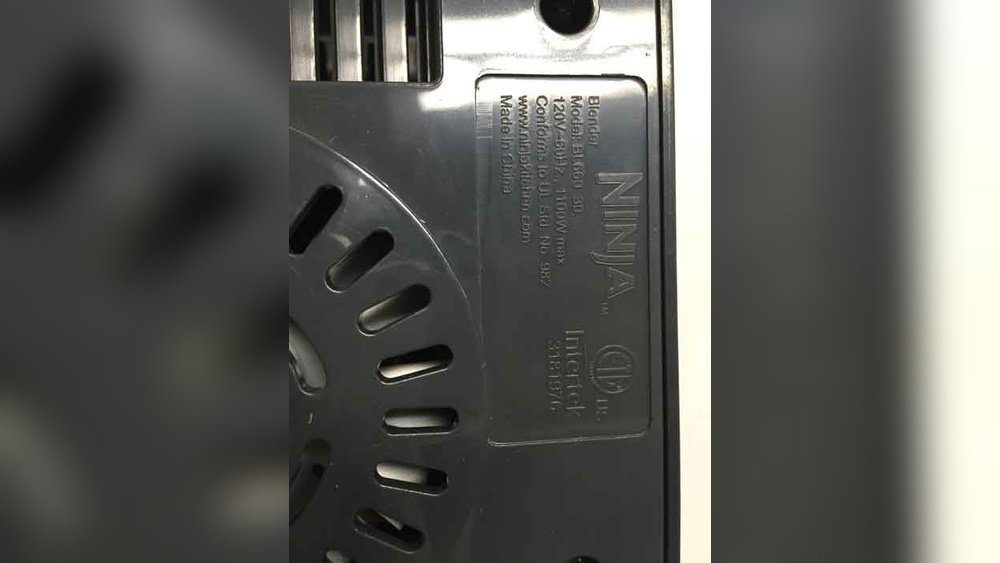
How To Find Ninja Blender Model: Quick and Easy Guide
If you own a Ninja Blender, you probably know how important it is to find its exact model number. This detail is essential for buying the right accessories, getting replacement parts, or even for warranty and support. Yet, many owners struggle to find this information, especially if the original box or manual is missing. In this guide, you will learn every practical way to find your Ninja Blender model, why it matters, and what to do if you still can’t locate it. Whether you are a new user or have had your blender for years, this article will help you decode your appliance and use it with confidence.
Why The Ninja Blender Model Number Matters
Many people don’t realize how critical the model number is until they face a problem. Ninja makes many blender types, from simple personal blenders to full kitchen systems. Each has unique parts and features. Here’s why knowing your model number is a must:
- Correct Accessories: Blades, jars, and lids often fit only specific models.
- Replacement Parts: Using the wrong part can cause leaks, damage, or even void your warranty.
- Product Support: Customer service will always ask for your model number.
- Safety: Some models have recalls or safety notices.
If you guess the model or use parts that “almost fit,” you risk wasting money or damaging your blender. Getting the model number right is the first step to a smooth blending experience.
Where To Look For The Model Number
Finding the Ninja Blender model is easier if you know where to check. The model number is usually a mix of letters and numbers, like BL610, BN701, or BL770.
1. On The Bottom Of The Base
The most common place to find your model number is on the bottom of the motor base. Turn your blender upside down (make sure it’s unplugged first). Look for a sticker or engraved plate. It usually shows:
- The model number (e.g., BL660)
- Serial number
- Manufacturing date
Tip: Use a flashlight if the print is faint or hard to see.
2. On The Back Or Side
Some Ninja blenders have the label on the back or side of the base. This is common for larger kitchen systems or older models. Look for a white or silver sticker.
3. Inside The Pitcher Or Underneath The Lid
For personal-sized blenders, like the Ninja Nutri Pro, the model number may be inside the pitcher or under the lid. Check the edges carefully.
4. On The Original Box Or Manual
If you still have the box or user manual, the model number is usually printed near the barcode or on the front cover.
5. On Your Purchase Receipt Or Online Order
Online retailers like Amazon or Walmart often include the model number in your order history or receipt. Search your email for “Ninja Blender” and check order details.
Non-obvious insight: Sometimes, the model number on your box or receipt may have extra letters (like “BL660WM”). The important part is usually the first set of letters and numbers (here, “BL660”). Accessories and parts are matched to this base number.
Understanding Ninja Blender Model Numbers
Ninja uses a simple naming system, but it can be confusing at first. The model number is not the same as the product’s “series” or “family name.”
- BL: Most classic Ninja blenders (e.g., BL610, BL770)
- BN: Newer models, often with smart features (e.g., BN701)
- CT: Chef or Touchscreen models
- QB: Master Prep models
- SS: Foodi Power Blender series
The numbers that follow often show the power level or version. For example, BL610 is a 1000-watt basic model, while BL770 is a full kitchen system.
Model Number Vs Serial Number
- Model Number: Tells you the product type and compatible parts.
- Serial Number: Unique to your unit, used for warranty or recalls.
Do not confuse these two. The model number is what you need for parts, accessories, and support.
Common Model Number Locations: Visual Guide
Below is a summary showing where to find the model number on common Ninja blenders:
| Blender Series | Model Number Location | Example Model |
|---|---|---|
| Professional (BL) | Bottom of base | BL610, BL660 |
| Foodi Power (SS) | Back or bottom of base | SS101, SS351 |
| Nutri Ninja (BN) | Under cup or on label | BN401, BN701 |
| Master Prep (QB) | Side of base | QB3001SS |
| Chef Touchscreen (CT) | Bottom or side of base | CT610 |
How To Read And Use Your Model Number
Once you find your Ninja Blender model, you need to know how to use it for parts or support. Here’s what to do next:
1. Search The Official Website
Visit the Ninja Kitchen official support page. Enter your model number to find:
- Product manuals
- Compatible parts
- FAQs
This is the safest way to avoid buying the wrong item.
2. Check For Parts Compatibility
Not all BL660 blenders, for example, use the same blade or pitcher. Some have “BL660W” or “BL660WM” on the box. Always match the first part of your model number, then double-check with the seller or Ninja support.
3. Register Your Product
If you haven’t already, register your blender using the model number. This helps with warranty claims and product updates.
Experience-based tip: Some models have small changes (like color or minor features) that don’t affect parts compatibility. Focus on the base model for accessories, but give the full number for customer support.
What To Do If The Model Number Is Missing Or Damaged
Sometimes, the label fades or falls off. Here’s what you can do if you can’t find your Ninja Blender model:
- Compare Photos Online: Go to the Ninja website or retailer sites. Compare your blender’s shape, button layout, and size to pictures.
- Check the Motor Power: Most model numbers relate to motor wattage. For example, BL610 is 1000 watts. Look for a wattage label.
- Look for Unique Features: Does your blender have Auto-iQ buttons? Is it a single-serve cup or a large pitcher? These details can narrow down the model.
- Contact Ninja Support: Send photos and a description to Ninja customer service. They can often identify the model for you.
Non-obvious insight: Even if you can’t find the model number, you can often use the wattage and unique features to match your blender to the right parts or manual.
Credit: www.cpsc.gov
Ninja Blender Model Comparison: Popular Models And Key Differences
To make things clearer, here’s a comparison of several popular Ninja blender models and their main features:
| Model | Power (Watts) | Pitcher Size | Auto-iQ | Personal Cups Included |
|---|---|---|---|---|
| BL610 | 1000 | 72 oz | No | No |
| BL660 | 1100 | 72 oz | No | Yes (2) |
| BN701 | 1400 | 72 oz | Yes | No |
| SS351 | 1400 | 72 oz | Yes | Yes (2) |
| QB3001SS | 700 | 24 oz (cup) | No | Yes (2) |
This table shows that even similar-looking models can have big differences in power, features, and included cups. Always match your exact model number to avoid buying the wrong parts.
When You Need The Model Number: Real-life Scenarios
You may wonder when you’ll actually need your Ninja Blender model. Here are common examples:
- Replacing a Broken Pitcher: Not all pitchers fit all models. For example, a BL660 pitcher will not always fit a BL610 base.
- Buying New Blades: Blade designs can change even within the same series.
- Finding a Manual: Download the correct instructions for cleaning and safety.
- Warranty Claims: Ninja will not honor warranty requests without your model number.
- Recalls or Safety Notices: Some models have been recalled for safety reasons.
In all these cases, guessing can lead to wasted time and money. Keeping your model number handy saves headaches later.
Advanced Tips For Identifying Older Or Discontinued Models
If your blender is several years old, the label may be faded or the model discontinued. Here are advanced strategies:
- Search for Old Manuals Online: Many manual websites and forums list old Ninja blenders with pictures.
- Join User Communities: Ninja owners often help each other with model identification in online groups.
- Contact Ninja Directly: Provide clear photos of the blender, base, and any labels. The company can often help even with discontinued models.
- Look for Unique Button Patterns: Older models have different button layouts, colors, or markings.
- Check Under Rubber Feet: Some older models have hidden labels under the rubber feet on the base.
Pro insight: Even if you can’t find the exact model, knowing the series and wattage can get you the right parts 90% of the time.
Mistakes To Avoid When Finding Or Using Your Model Number
Many Ninja owners make simple mistakes that cause frustration:
- Mixing Up Model and Serial Number: These are different. Always use the model for parts and accessories.
- Buying Parts for a Similar Model: “Almost the same” is not good enough. Small differences in pitchers or blades can mean they won’t fit.
- Ignoring Extra Letters: Retailers sometimes add extra letters for exclusive models (like BL660WM for Walmart). Focus on the base number, but check for unique features.
- Assuming New Parts Fit Old Models: Ninja updates designs. A new blade or lid may not fit an older blender, even if the base model number is similar.
- Trusting Only the Box: The box may list a “family name” or series. Always check the sticker on the actual machine.

Credit: www.purewow.com
Using The Model Number For Warranty And Support
If you need help from Ninja or want to register your product, your model number is your key. Here’s how to use it:
- Register Online: Go to the Ninja website and fill in your model and serial number. This protects your warranty and makes future claims easier.
- Contact Customer Service: Always have your model number ready. It speeds up the process.
- Download Manuals: Use the model number for the exact instructions for your machine.
- Check for Recalls: Search for your model number on the Ninja recall page if you have safety concerns.
For more in-depth support, you can visit the Ninja Kitchen Support page, which offers manuals, troubleshooting, and live chat.
Ninja Blender Model Lookup: Online Tools And Resources
Besides checking your blender, you can use these online tools to identify your Ninja Blender model:
- Ninja’s Official Support Page: Enter your model number to find manuals and parts.
- Retailer Sites: Large stores often show all specs and model numbers with pictures.
- Parts Suppliers: Sites that sell Ninja parts list compatible model numbers.
- YouTube Reviews: Video reviews often show the model number location and features.
- Online Manuals Databases: Sites like ManualsLib let you search by brand and model.
Practical tip: Save a photo of your model number sticker on your phone. This prevents future confusion, especially if you buy more than one Ninja appliance.
Table: Common Ninja Blender Model Numbers And Features
Here’s a quick reference for some well-known Ninja blender models:
| Model | Series | Wattage | Main Features |
|---|---|---|---|
| BL610 | Professional | 1000W | Large pitcher, simple controls |
| BL660 | Professional | 1100W | Single-serve cups, high power |
| BN701 | Nutri Ninja | 1400W | Auto-iQ, smart programs |
| SS351 | Foodi Power | 1400W | Heated blending, food processor option |
| CT610 | Chef Touchscreen | 1000W | Touchscreen controls, sleek design |
Keeping Track Of Your Ninja Blender Model
To avoid future confusion, make a habit of recording your model number:
- Take a photo of the sticker right after purchase.
- Write it in your phone or a notebook.
- Register the product on the Ninja website.
- Keep the manual or a screenshot in a safe place.
These simple steps can save you time and hassle for years.
:max_bytes(150000):strip_icc()/sea-personal-blenders-lead-image-nutribullet-smeg-ninja-ashia-aubourg-02-2fe28ce691d047cb956a51c541330b3d.jpeg)
Credit: www.seriouseats.com
Frequently Asked Questions
How Do I Know If My Ninja Blender Is Genuine?
Look for the Ninja logo, model number sticker, and a UL or ETL safety label. Genuine Ninja products are sold by major retailers and on the official Ninja website. If the price is much lower than usual, be careful—counterfeit blenders often lack proper labeling and may be unsafe.
Can I Use Parts From A Different Ninja Blender Model?
Usually not. Even similar-looking blenders may have small differences in the pitcher, blade, or lid. Always match the exact model number to ensure compatibility. Using the wrong part can damage your blender or cause leaks.
What If My Model Number Is Missing Or Faded?
Try to identify your blender by comparing its design and features with photos on the Ninja website or retailer sites. You can also check the wattage and unique buttons. If you still can’t find the model, contact Ninja support with photos for help.
Is The Model Number The Same As The Serial Number?
No. The model number identifies the product type and is used for parts and manuals. The serial number is unique to your machine and is needed for warranty claims or recalls.
Where Can I Find Ninja Blender Replacement Parts?
The safest source is the Ninja Kitchen official website. You can also find parts at major retailers and trusted online stores. Always check that the part matches your exact model number before buying. For more information, see the Consumer Reports Ninja Blender Review.
Finding your Ninja Blender model is the key to a long, trouble-free appliance life. With the steps and resources in this guide, you can confidently identify your model and get the best from your Ninja blender. Whether you need parts, support, or just want to register your device, the model number unlocks all the help and accessories you’ll ever need.