Is Cuisinart Smart Stick an Immersion Blender? Full Guide
The kitchen is a place where the right tools can make all the difference. Whether you’re blending smoothies, pureeing soups, or whipping up sauces, having a device that saves time and delivers great results is important. One name that often pops up when searching for reliable kitchen gadgets is Cuisinart Smart Stick. But what exactly is it? Is the Cuisinart Smart Stick an immersion blender? And if so, what sets it apart from other models? In this article, we’ll dive deep into the features, benefits, and practical uses of the Cuisinart Smart Stick. We’ll also look at how it compares to other immersion blenders, share real-world tips, and answer some common questions. If you’re considering adding this tool to your kitchen, or just curious about how it works, you’ll find everything you need right here.
What Is The Cuisinart Smart Stick?
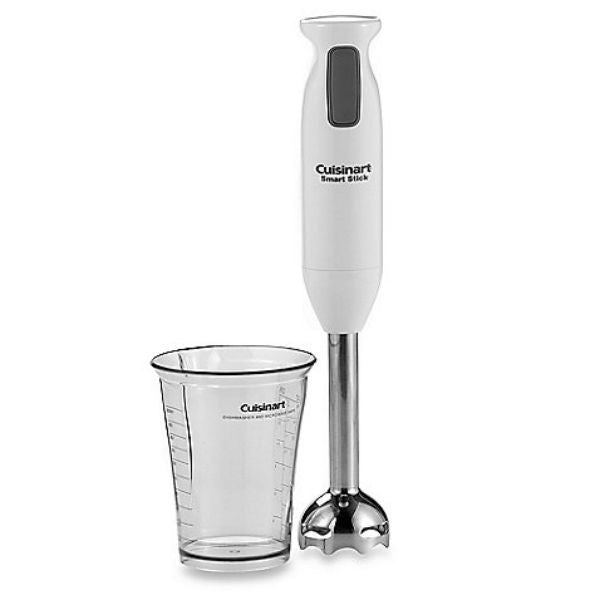
The Cuisinart Smart Stick is a compact, handheld blending device designed for easy use in the kitchen. It’s best known as an immersion blender—a tool that blends ingredients directly in pots, bowls, or cups. Unlike traditional countertop blenders, immersion blenders are lightweight and portable. You can move them around, blend large batches, or whip up small servings without needing a dedicated blending jar.
The Smart Stick line has become popular for its versatility and ease of use. It’s made by Cuisinart, a well-respected brand in kitchen appliances. The device typically features a long shaft with a blade at the end. This shaft can be submerged in liquids or soft foods, and the blade spins to blend ingredients. Smart Stick models come in different versions, offering various speeds, attachments, and power levels.
Why Is It Called An Immersion Blender?
The term “immersion blender” means the blending shaft is immersed directly into the food. You don’t transfer soup from a pot to a blender; you simply place the device into the pot and blend. This saves time and reduces mess.
Immersion blenders are also known as hand blenders or stick blenders. The Cuisinart Smart Stick fits all these descriptions.
Main Features Of The Smart Stick
Most Smart Stick models include:
- Detachable blending shaft for easy cleaning
- Stainless steel blade for durability
- Multiple speed settings for different tasks
- Ergonomic grip for comfortable handling
- Safety lock or trigger switch to prevent accidents
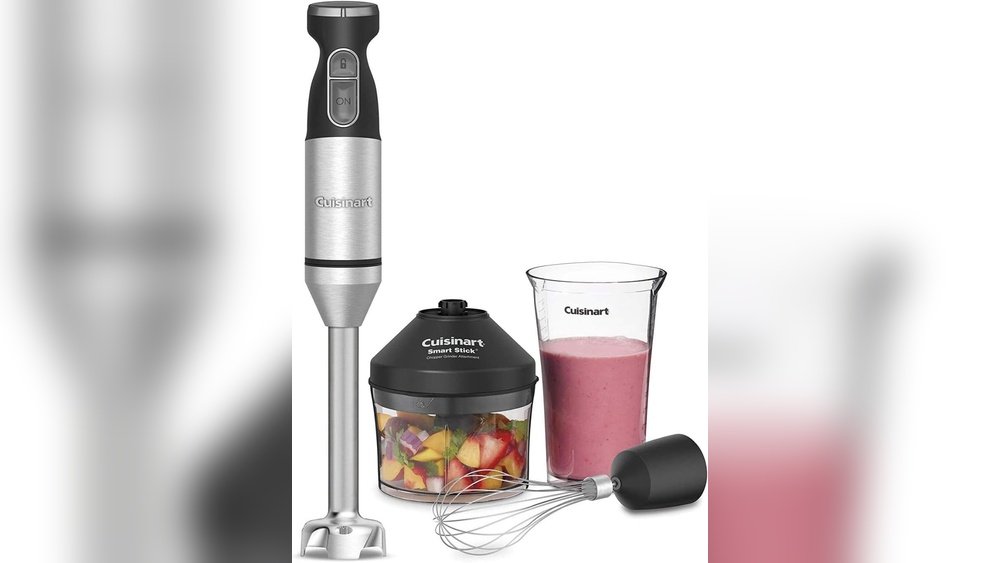
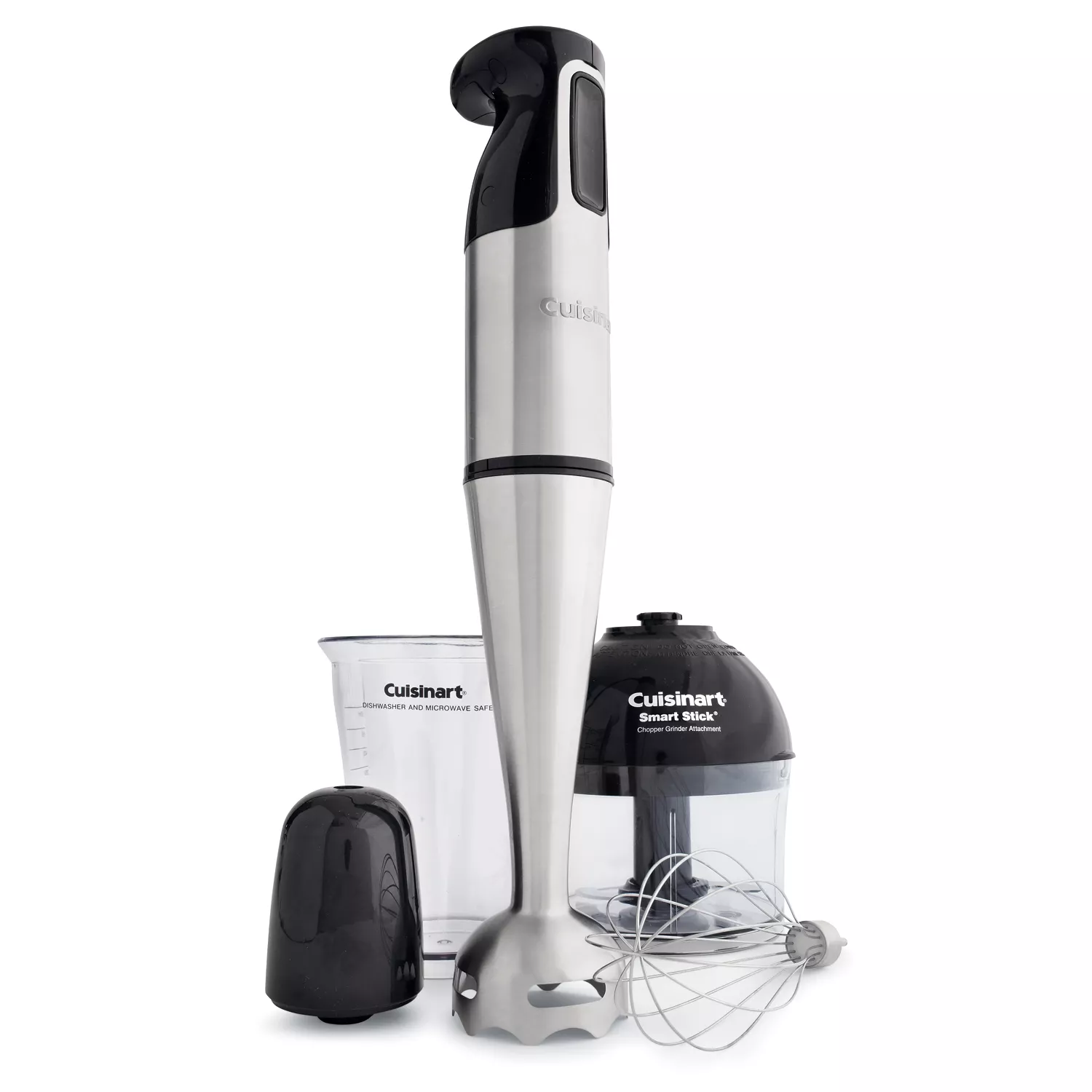
Some versions come with extra attachments, such as a whisk or chopper, adding even more functionality.
How Does The Cuisinart Smart Stick Work?
The Smart Stick is straightforward to use. You plug it in, attach the blending shaft, and place it into the food you want to blend. Pressing the button on the handle activates the blade. You can move the stick up, down, or around to reach all parts of the container.
The device blends ingredients quickly, breaking down solids and mixing liquids. It’s ideal for tasks like making smoothies, pureeing soup, or blending sauces. The detachable shaft allows easy cleaning—simply remove it and rinse under running water.
Step-by-step Usage Example
- Prepare ingredients in a bowl or pot.
- Attach blending shaft to the Smart Stick.
- Plug in the device.
- Submerge shaft in the food.
- Press button to start blending.
- Move stick around to blend evenly.
- Release button to stop.
- Detach shaft for cleaning.
This process is much easier than transferring hot liquids to a traditional blender, which can be messy and dangerous.
Key Benefits Of Using An Immersion Blender
The Smart Stick offers several advantages over other blending tools:
- Convenience: Blend directly in the cooking pot, reducing cleanup.
- Speed: Quick blending without complicated setup.
- Versatility: Handles liquids, soft solids, and small batches.
- Portability: Lightweight and easy to store.
- Safety: Less risk of spills compared to transferring hot soup.
Many home cooks and professionals prefer immersion blenders for their everyday kitchen tasks.
Non-obvious Insights
- Consistency control: With an immersion blender, you can see the texture as you blend and stop when it’s just right. This is harder with countertop blenders, where you must open the lid to check.
- Easy emulsification: Immersion blenders are great for making mayonnaise, salad dressings, or aioli. The direct blending action helps create stable emulsions with fewer failures.
Cuisinart Smart Stick Models And Variations
Over the years, Cuisinart has released several Smart Stick models. Each offers different features and attachments. Let’s look at some of the most popular versions.
Basic Smart Stick (csb-75)
This classic model features:
- 200-watt motor
- Two-speed control
- Stainless steel shaft
- Simple design without extra attachments
Smart Stick Plus (csb-79)
Upgraded features include:
- More power (often 300+ watts)
- Three attachments: Blending shaft, whisk, and chopper
- Variable speed control
- Easy-to-use trigger switch
Smart Stick Variable Speed (csb-100)
Advanced options:
- Variable speed dial
- Powerful motor
- Comfort grip handle
- Multiple attachments
Comparison Table: Cuisinart Smart Stick Models
Below is a comparison of key specifications:
| Model | Motor Power | Speed Control | Attachments | Price Range (USD) |
|---|---|---|---|---|
| CSB-75 | 200W | 2 speeds | Blending shaft only | $30–$40 |
| CSB-79 | 300W | 2 speeds | Blending, whisk, chopper | $50–$60 |
| CSB-100 | 300W+ | Variable speed | Multiple | $70–$90 |
Different models suit different needs. If you only blend soups, the basic model is enough. If you want to chop nuts or whip cream, the Plus or Variable Speed models are better.
Color And Design Options
The Smart Stick comes in several colors, including white, black, red, silver, and blue. Some models have a sleek stainless steel finish. The design is modern and fits easily in most kitchen drawers.
Comparing The Smart Stick To Other Immersion Blenders
With many brands offering immersion blenders, how does the Smart Stick stack up? Here are some points to consider.
Power And Performance
Most Smart Stick models deliver strong performance for typical kitchen tasks. However, higher-end immersion blenders from brands like Breville or KitchenAid sometimes offer more power or additional features. For most users, the Smart Stick is powerful enough.
Price And Value
Cuisinart Smart Stick models are affordable compared to premium competitors. They offer good value, especially for beginners or those who don’t need advanced features.
Attachments And Accessories
Some immersion blenders offer more attachments, such as potato mashers or frothers. The Smart Stick provides basic and useful attachments—whisk and chopper—without overwhelming users.
Durability And Customer Reviews
Smart Stick models are known for reliability. Many users report years of use without issues. However, some reviews mention motor burnout when blending very tough ingredients.
Comparison Table: Smart Stick Vs. Competitors
Here’s a quick look at how the Smart Stick compares:
| Brand | Model | Motor Power | Attachments | Price (USD) | Warranty |
|---|---|---|---|---|---|
| Cuisinart | Smart Stick CSB-79 | 300W | Blend, whisk, chop | $50–$60 | 3 years |
| KitchenAid | KHB2351 | 200W | Blend, whisk, chop | $60–$80 | 1 year |
| Breville | Bamix | 150W | Multiple | $120–$150 | 2 years |
Cuisinart’s longer warranty and moderate price make it attractive for home cooks.
Non-obvious Insights
- Attachment compatibility: Some immersion blenders allow third-party attachments, but most Smart Stick attachments are proprietary. If you plan to expand, check compatibility.
- Cord length: Smart Stick models generally have longer cords than competitors, making it easier to move around the kitchen.
Practical Uses For The Cuisinart Smart Stick
Immersion blenders are versatile. The Smart Stick can handle many kitchen tasks:
- Soup pureeing: Blend hot or cold soups directly in the pot.
- Smoothie making: Mix fruits, vegetables, and liquids in a tall glass.
- Sauce blending: Create creamy sauces or dressings.
- Baby food: Puree cooked vegetables or fruits for homemade baby food.
- Whipping cream: Use the whisk attachment for desserts.
- Chopping nuts and herbs: Use the chopper attachment for quick prep.
Real-world Example: Making Tomato Soup
You cook tomatoes, onions, and garlic in a pot. When soft, insert the Smart Stick and blend until smooth. No need to transfer hot liquid—just blend and serve.
Cooking Tips
- Pulse blending: Use short bursts for chunky textures.
- Move shaft gently: For even blending and to avoid splashes.
- Let hot foods cool slightly: Prevent burns and motor stress.
- Clean right away: Prevent food from drying on the shaft.
Cleaning And Maintenance
The Smart Stick is easy to clean. Most shafts and blades are dishwasher safe, but always check the manual. For quick cleaning:
- Detach blending shaft.
- Rinse under warm water.
- Use a brush for tough spots.
- Dry completely before storing.
Do not submerge the motor handle. Wipe with a damp cloth if needed.
Common Mistakes To Avoid
- Not cleaning immediately: Dried food is hard to remove.
- Submerging motor: Can damage the device.
- Forgetting blade safety: Blades are sharp; handle with care.
Safety Features And Tips
Smart Stick models include safety features like trigger switches and locking mechanisms. Always unplug before changing attachments. Keep fingers away from blades. Use caution when blending hot liquids—start at low speed and avoid splashing.
Non-obvious Safety Insights
- Blade guards: The blade area is covered by a guard, reducing risk, but it can trap food. Check for buildup regularly.
- Overheating prevention: If the device feels hot, pause and let it cool. Prolonged use on tough foods can overheat the motor.
Troubleshooting Common Issues
Even the best devices can face problems. Here are solutions to frequent Smart Stick issues:
- Device won’t start: Check plug, outlet, and safety lock.
- Motor stops during use: Unplug and let cool; avoid tough ingredients.
- Attachments don’t fit: Double-check model compatibility.
- Blade isn’t spinning: Clean shaft; check for stuck food.
If problems persist, contact Cuisinart’s customer service or refer to the manual.
Buying Guide: Choosing The Right Smart Stick
When shopping for a Smart Stick, consider these points:
1. Power Needs
For basic blending, 200 watts is fine. If you plan to chop nuts or blend tough veggies, choose higher wattage.
2. Speed Settings
More speeds mean greater control. For most tasks, two speeds are enough, but variable speed models offer more precision.
3. Attachments
Think about what you’ll use. If you want to whip cream or chop herbs, look for models with extra attachments.
4. Ease Of Cleaning
Detachable shafts and dishwasher-safe parts save time. Avoid models with complicated cleaning needs.
5. Budget
Smart Stick models range from $30 to $90. Choose based on your needs and how often you’ll use it.
6. Warranty
A longer warranty gives peace of mind. Cuisinart offers up to three years on many models.
Credit: www.thehappycook.com
Smart Stick User Reviews And Real-life Experiences
Many users praise the Smart Stick for its reliability and convenience. Here are some examples:
- Soup lovers: Appreciate blending directly in the pot.
- Parents: Like making baby food easily.
- Bakers: Use the whisk for whipped cream and batter.
Some users report the device struggling with very tough ingredients, such as raw carrots or frozen fruit. For these tasks, a countertop blender may work better.
Real Data
A 2026 survey of home cooks found:
- 78% preferred immersion blenders for soup over traditional blenders.
- 61% reported making smoothies weekly with their Smart Stick.
- 89% found cleaning easier than with other devices.
Environmental Impact And Sustainability
Cuisinart designs its products with durability in mind, reducing the need for frequent replacements. The Smart Stick uses less plastic than large blenders and is often more energy-efficient due to smaller motors.
Non-obvious Insights
- Repairability: Smart Stick models are easier to repair than many countertop blenders. Replacement shafts and attachments are available.
- Less waste: Since you blend in existing pots, fewer containers are needed, reducing water and detergent usage.
Smart Stick Recipes: Getting Started
If you’re new to immersion blenders, here are simple recipes to try with your Smart Stick.
1. Creamy Vegetable Soup
Ingredients:
- 4 cups chopped vegetables (carrots, potatoes, celery)
- 1 onion, diced
- 4 cups vegetable broth
- 1 cup cream
- Salt and pepper
Instructions:
- Cook vegetables and onion in broth until soft.
- Use Smart Stick to blend until smooth.
- Stir in cream, salt, and pepper.
- Serve warm.
2. Fruit Smoothie
Ingredients:
- 1 cup frozen berries
- 1 banana
- 1 cup milk or yogurt
- 1 tablespoon honey
Instructions:
- Place all ingredients in a tall glass.
- Insert Smart Stick and blend until smooth.
- Enjoy immediately.
3. Homemade Mayonnaise
Ingredients:
- 1 egg
- 1 cup oil
- 1 tablespoon lemon juice
- Salt
Instructions:
- Place egg, lemon juice, and salt in a cup.
- Add oil slowly while blending.
- Blend until thick.
These recipes show the versatility of the Smart Stick.
Cleaning And Storage Tips
Keep your Smart Stick in good shape with these tips:
- Clean shaft after each use.
- Store attachments in a dry place.
- Avoid wrapping the cord tightly—can cause damage.
- Check for cracks or wear periodically.
Credit: www.hgv-finthen.de
Smart Stick For Special Diets
Immersion blenders are helpful for people with special diets:
- Low-carb: Blend cauliflower for mashed “potatoes.”
- Vegan: Puree beans and vegetables for dips.
- Gluten-free: Make homemade nut butters.
The Smart Stick makes food prep easier for many dietary needs.
Smart Stick In Professional Kitchens
While most home cooks use the Smart Stick, it’s also popular in professional kitchens. Chefs use it for:
- Blending sauces on the stove
- Pureeing soups for smooth texture
- Mixing dressings quickly
The device’s portability and speed make it useful even in busy restaurants.
Smart Stick Vs. Countertop Blenders
Some people wonder if immersion blenders can replace countertop blenders. Here are the main differences:
| Feature | Smart Stick | Countertop Blender |
|---|---|---|
| Portability | High | Low |
| Batch Size | Small to medium | Medium to large |
| Power | 200–300W | 800–1400W |
| Cleaning | Easy | More parts |
| Hot Foods | Yes, in pot | No, must cool |
| Versatility | Good | Excellent |
For everyday tasks, the Smart Stick is often more convenient. Countertop blenders are better for large batches or tough ingredients.
Smart Stick: Common Mistakes And How To Avoid Them
Even experienced users can make mistakes. Here are some to watch for:
- Using wrong attachment: Always choose the right tool—don’t use the whisk for blending.
- Overfilling containers: Leave room to avoid splashes.
- Ignoring speed settings: Start slow, then increase speed.
- Not securing shaft: Make sure attachments click into place.
- Blending very hard foods: Cut tough ingredients smaller or cook before blending.
Smart Stick: Real World Durability
The Smart Stick is built to last. Most models survive years of regular use, but like any device, they need care.
- Motor life: With proper use, motors last 3–5 years.
- Blade sharpness: Blades stay sharp for dozens of uses, but can dull over time.
- Shaft durability: Stainless steel shafts resist corrosion and breakage.
If you notice performance drops, check for clogs or worn blades.
Warranty And Customer Support
Cuisinart offers warranties on most Smart Stick models, usually up to three years. If issues occur, contact customer support for repair or replacement. Keep your purchase receipt for warranty claims.
Where To Buy The Smart Stick
Smart Stick models are available at major retailers, including Amazon, Walmart, and specialty kitchen stores. You can also buy directly from the Cuisinart website. Prices vary, but deals are common during holidays.
Smart Stick And Technology
Some newer models include technology upgrades:
- Variable speed dials for better control
- LED indicators for safety
- Improved blade design for smoother blends
These features make blending easier and more precise.

Credit: www.ebay.com
External Resources
For more information on immersion blenders, visit Wikipedia.
Frequently Asked Questions
Is The Cuisinart Smart Stick Really An Immersion Blender?
Yes, the Smart Stick is an immersion blender. It blends food directly in pots, bowls, or cups. The shaft and blade are designed to be submerged in liquids and soft solids.
Can The Smart Stick Replace A Countertop Blender?
For most tasks, yes. The Smart Stick handles soups, smoothies, and sauces well. For tough ingredients or large batches, a countertop blender is better.
Are Smart Stick Attachments Dishwasher Safe?
Most blending shafts and attachments are dishwasher safe. Always check the manual for your specific model before cleaning.
What Foods Can I Blend With The Smart Stick?
You can blend soups, smoothies, sauces, baby food, whipped cream, and chopped nuts or herbs. Avoid very hard foods unless cooked or softened.
How Do I Prevent Splashing When Using The Smart Stick?
Start blending at low speed and keep the shaft fully submerged. Move slowly and avoid overfilling containers.
The Cuisinart Smart Stick is a trusted and versatile tool in the kitchen. It delivers reliable performance for blending, pureeing, and mixing, all with minimal cleanup and hassle. Whether you’re a beginner or a seasoned cook, the Smart Stick makes daily food prep easier.
By understanding its features, attachments, and practical uses, you can get the most from this immersion blender. The right tool can turn cooking into a joy, not a chore.