What Speeds To Use On Immersion Blender for Perfect Results
The immersion blender is one of the most versatile tools in the kitchen. With its handheld design and sharp blades, it can blend, puree, chop, and emulsify foods right in the bowl or pot. But there’s one part many people overlook: speed settings. Choosing the right speed isn’t just about convenience—it’s about getting the texture, consistency, and results you want. If you’ve ever wondered which speeds to use for different foods, or why your soup turns out too thin or your mayo breaks, this guide will help. We’ll explore how speed settings work, which speeds are best for various tasks, and share practical tips most beginners miss. By the end, you’ll know exactly how to use your immersion blender’s speeds for perfect results every time.
Understanding Immersion Blender Speed Settings
Immersion blenders, sometimes called stick blenders or hand blenders, usually come with multiple speed options. Some models offer just two (low and high), while others may have up to five or even variable speeds controlled by a dial or button.
But what do these speeds actually mean?
How Speed Settings Work
Speed settings control the rotation speed of the blade. A low speed spins the blade slower, creating gentle mixing. A high speed makes the blade spin faster, causing vigorous blending and finer purees. The number of speed options can vary:
- Basic models: Usually two speeds, labeled as low and high.
- Advanced models: Often have 3–5 speeds, or a variable speed dial.
Here’s a quick look at how speed options are typically labeled:
| Speed Setting | Description | Common Uses |
|---|---|---|
| Low | Gentle rotation | Mixing, light blending |
| Medium | Moderate rotation | Pureeing, sauces |
| High | Rapid rotation | Smoothies, soups, emulsifying |
| Turbo/Boost | Maximum speed (short bursts) | Ice crushing, tough ingredients |
Most immersion blenders are designed to be used with one hand. This makes it easy to switch between speeds quickly while blending. However, using the right speed at the right time is what separates average results from great ones.
Variable Speed Vs. Fixed Speed
Some blenders have a variable speed dial. This lets you fine-tune the blade speed, giving more control over texture. Others have fixed speeds, usually with a button for each setting. Variable speed models are ideal for recipes needing gradual blending, like soups or batters.
When To Use Each Speed Setting
Choosing the right speed can change the outcome of your recipe. Here’s how to decide:
Low Speed
Low speed is best for gentle mixing, avoiding splashes, and keeping textures chunky.
- Stirring soups: If you want some vegetables to stay whole, use low speed.
- Mixing batters: For pancake or waffle batter, low speed keeps air bubbles.
- Blending delicate foods: Use low for soft fruits or cooked potatoes to avoid over-processing.
Low speed is also ideal when starting to blend a new mixture. It helps you control the process and prevents sudden splashes.
Medium Speed
Medium speed offers a balance between power and control.
- Pureeing soft ingredients: Cooked vegetables, beans, or fruits.
- Making sauces: Tomato sauce, pesto, or salsa.
- Blending soups: For creamy but not perfectly smooth results.
If you want a texture that’s neither chunky nor super smooth, medium speed is your friend. Many cooks use medium for most tasks unless the recipe demands something specific.
High Speed
High speed is for when you need a completely smooth, uniform texture.
- Smoothies and shakes: Blends ice, fruit, and liquids fast.
- Creamy soups: Turns cooked vegetables and broth into a velvety puree.
- Emulsifying: Mayonnaise, hollandaise, salad dressings.
High speed can handle tough ingredients and breaks down fibers. If your blender has a “turbo” or “boost” mode, use it only for short bursts—usually under 10 seconds—since it can overheat the motor.
Turbo/boost
Some blenders feature a turbo or boost setting. This pushes the blade to its highest speed for a few seconds.
- Crushing ice: Only use turbo for quick bursts.
- Breaking down tough ingredients: Nuts, seeds, frozen fruit.
- Finishing touch: If you want a super-smooth soup, a short turbo burst at the end works well.
Turbo is not for continuous use—it’s best for short tasks or finishing steps.
Matching Speed To Recipe: Practical Examples
Let’s look at real recipes and which speed is best for each. These examples show how the right speed improves results.
Soup
Chunky vegetable soup: Start on low speed to mix, then pulse on medium for a few seconds if you want some pieces left.
Creamy tomato soup: Use medium speed to blend most ingredients, then switch to high for a smooth finish.
Butternut squash soup: Blend on high speed until silky. If you see chunks, use turbo for a few seconds.
Smoothies
Fruit smoothies: Start on medium to break up fruit. Switch to high to blend ice and make it smooth.
Green smoothies: Use high speed for leafy greens and tough stems. Turbo can help if you want a completely smooth texture.
Sauces
Pesto: Use medium speed to blend basil and nuts, but avoid high speed if you want a chunky texture.
Mayonnaise: Start on low speed to mix egg and oil, then increase to high for emulsifying.
Salsa: Pulse on low or medium for a chunky salsa. High speed will make it too runny.
Batters
Pancake batter: Use low speed to mix ingredients gently and keep the batter light.
Cake batter: Medium speed works well—don’t overmix, as high speed can make the cake dense.
Baby Food
Purees: Start on medium speed, then use high to get a smooth texture. For softer foods, low speed may be enough.
Whipping
Some immersion blenders come with a whisk attachment. Use high speed for whipping cream or egg whites. If you want soft peaks, use medium speed.
Tips For Using Immersion Blender Speeds
Most people use high speed for everything. But small adjustments can make a big difference. Here are some tips:
- Start slow, then increase speed: Prevents splashing and gives more control.
- Pulse mode for chunky textures: Short bursts on low or medium keep some pieces intact.
- Use turbo sparingly: Only for tough ingredients or finishing a blend.
- Don’t over-blend: High speed can make some foods gluey (like potatoes).
- Let the blender do the work: Pressing down hard isn’t necessary—let the speed handle it.
- Move the blender gently: Slow up-and-down motions help blend evenly.
- Check consistency often: Stop and look at the texture before continuing.
These steps help avoid common mistakes, like watery salsa or gluey mashed potatoes.

Credit: www.amazon.com
Common Mistakes Beginners Make With Immersion Blender Speeds
Even experienced cooks can make errors with speed settings. Here are mistakes to avoid:
- Starting too fast: Causes splashes, especially with liquids.
- Using high speed for everything: Destroys texture in chunky soups and salsas.
- Ignoring pulse mode: Leads to over-blending.
- Holding turbo too long: Can burn out the motor or make food too thin.
- Not adjusting speed for different ingredients: Tough foods need higher speeds, but delicate foods are best at low or medium.
One non-obvious insight: high speed can create too much heat, which can affect flavor. For example, blending herbs at high speed for too long can make them taste bitter.
Comparing Immersion Blender Speed Features
Not all immersion blenders are equal. Here’s a comparison of typical speed features among popular models:
| Brand/Model | Speeds | Control Type | Best For |
|---|---|---|---|
| KitchenAid KHB2351 | 2 | Button | Basic blending, soups |
| Breville BSB510XL | 15 | Variable dial | Fine control, sauces, smoothies |
| Braun MQ505 | 2 | Button | Quick purees, batters |
| Cuisinart CSB-79 | 2 | Button | Soups, chopping |
| All-Clad KZ750D | Variable | Dial | Professional results, emulsifying |
If you frequently cook recipes needing exact texture, a model with more speed options is best. For basic blending, two speeds are usually enough.

Credit: www.amazon.com
Adjusting Speed For Different Ingredients
Different foods require different speeds, even within the same recipe. Here’s how to adjust:
- Soft foods: Use low or medium speed. Examples: cooked vegetables, ripe fruit.
- Hard foods: Start on medium, switch to high. Examples: raw carrots, nuts.
- Liquids: Start on low to avoid splashes, then go higher.
- Sticky mixtures: Use high speed sparingly, as it can make them too thick or gluey.
Some foods, like potatoes, can become gluey if blended too fast. For mashed potatoes, use low speed and avoid over-blending. For fibrous foods like celery or kale, high speed is necessary to break down fibers.
Speed Settings And Texture Control
Texture is key in cooking. Immersion blender speeds let you control it:
- Chunky textures: Use low speed and pulse mode.
- Smooth textures: Use high speed, sometimes with turbo.
- Creamy: Start on medium, finish on high.
- Light and airy: Medium speed for whipped ingredients.
If you want texture variation, blend in stages. For example, blend half the soup on high, then mix in the rest with low speed. This gives both creamy and chunky bites.
Credit: www.webstaurantstore.com
Cleaning And Safety Tips For Different Speeds
Cleaning your immersion blender is easier when you use the right speed. High speed can splatter food, making cleanup harder. To avoid mess:
- Clean after each use: Rinse blade at low speed in a cup of water.
- Avoid high speed outside recipes: Only use high speed for blending food, not cleaning.
Safety is also important. Always unplug the blender before cleaning or changing speed settings. Never put fingers near the blade, even when off.
Using Speed Settings With Attachments
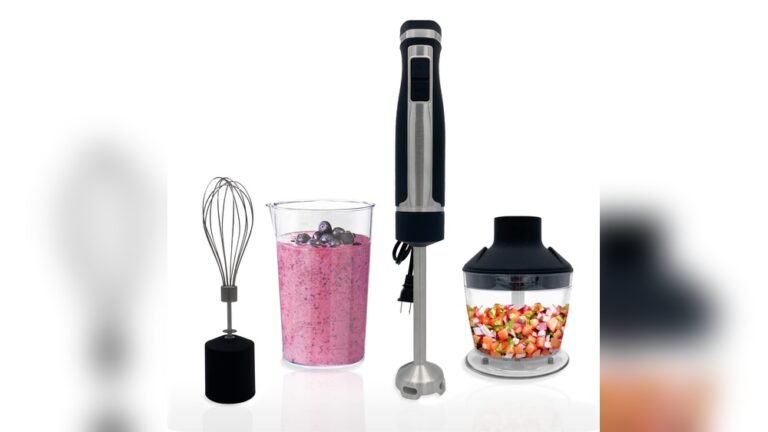
Many immersion blenders come with attachments like a whisk, chopper, or beaker. Speed settings matter here too:
- Whisk attachment: Use high speed for whipping cream or egg whites. Medium for softer peaks.
- Chopper attachment: Medium speed for nuts and herbs; high for tough vegetables.
- Beaker: Start on low to avoid splashes, then increase speed as needed.
Each attachment works best with specific speeds. Experiment to find what works for your recipes.
How To Test And Adjust Speed For Perfect Results
The best way to master speed settings is to test and adjust. Here’s a simple process:
- Start with the lowest speed: Blend for a few seconds.
- Check texture: Stop and look at the result.
- Increase speed if needed: If not smooth enough, go to medium or high.
- Use turbo only if necessary: For tough ingredients or final smoothing.
Keep a notebook or take photos of your results. Over time, you’ll learn which speeds give the best texture for your favorite recipes.
Expert Advice: Speed Setting Mistakes You Should Never Make
Many people make mistakes that can ruin food or damage the blender. Here are two non-obvious insights:
- Never blend hot liquids on high speed immediately: Steam can cause splashes and burns. Start low and increase gradually.
- Don’t use turbo or high speed continuously: Most immersion blenders aren’t built for long high-speed use. This can overheat the motor, leading to breakdown.
Also, check your blender’s manual. Some brands recommend specific speeds for different ingredients. Ignoring these can void warranties or cause damage.
Immersion Blender Speed: Frequently Asked Questions
Frequently Asked Questions
What Speed Should I Use For Blending Hot Soup?
Start on low speed to avoid splashes from steam, then switch to medium or high as the soup cools slightly. Don’t use turbo until the soup is lukewarm and well blended.
Can I Use High Speed For Making Salsa?
High speed will turn salsa into a puree. If you want chunky salsa, use low or medium speed and pulse for short bursts.
How Do I Prevent Splattering With My Immersion Blender?
Always begin on low speed, especially with liquids. Use a tall container or keep the blade fully submerged. Move the blender gently and increase speed only after the mixture is partially blended.
Is Turbo Mode Safe For All Foods?
Turbo mode is safe for short bursts but not for delicate foods or continuous use. Use turbo for tough ingredients like nuts, ice, or finishing a smoothie, but avoid it with soft or liquid foods.
What’s The Best Speed For Making Mayonnaise?
Start on low speed to combine egg and oil slowly. Increase to high speed once the mixture starts to thicken. This creates a stable emulsion and prevents separation.
Immersion blenders can do much more than basic blending. By understanding and using the right speeds, you gain control over texture and taste. Whether you’re making chunky salsa, creamy soup, or fluffy whipped cream, speed settings are your secret tool. Try adjusting speeds for each recipe, and soon you’ll see the difference in your cooking. For more technical details on immersion blenders, check out Wikipedia. With these tips, your immersion blender will become your go-to kitchen helper—no matter what you’re making.