Why Is My Cuisinart Immersion Blender Blinking? Troubleshooting Tips
If your Cuisinart immersion blender is blinking, you may be worried that something is wrong. You’re not alone—many users experience this issue and wonder what it means. Is the blinking a warning? Is it a sign of a problem? Or is it just normal behavior for the blender? In this article, you’ll find clear answers and practical advice. You’ll learn why your Cuisinart immersion blender blinks, how to fix it, and what you can do to avoid future problems. We’ll cover common causes, troubleshooting steps, and insider tips that most beginners miss. By the end, you’ll feel confident about handling this blinking issue, and you’ll know exactly what to do next.
What Does The Blinking Light Mean?
The blinking light on a Cuisinart immersion blender usually acts as a signal. It’s not just a decorative feature—it’s designed to communicate with you. So, what is it trying to say?
Most often, a blinking light indicates one of the following:
- The blender is not ready to operate.
- There is a safety lock or interlock active.
- The blender is overheated or has detected a problem.
- A component is not attached properly.
Understanding these signals is important. The blinking is rarely random; it is almost always a response to a specific condition inside the blender.
Interlock And Safety Features
The interlock system in many Cuisinart immersion blenders prevents the motor from running unless all parts are correctly assembled. If the light blinks, it may mean:
- The blending shaft isn’t snapped in tightly.
- The power button is pressed while the blender is not assembled.
- The cup or bowl you’re blending in is not suitable or stable.
This design protects you from accidents and also helps the blender last longer.
Overheating Protection
If you’ve been blending for a long time, or if you’re working with thick mixtures, the motor can get hot. The blinking light may warn you of overheating. This prevents motor damage and lets you know to stop and let the blender cool down.
Electrical Issues
Sometimes, the blinking light can be triggered by electrical problems:
- Low voltage from your power outlet.
- A loose power cord or plug.
- Internal circuit board errors.
These issues are less common but should be considered, especially if other appliances in your kitchen are acting strangely.
Examples Of Blender Models
Different models have slightly different meanings for the blinking light. Here’s a quick comparison:
| Model | Blinking Light Meaning | Action Required |
|---|---|---|
| CSB-75 | Safety lock or improper assembly | Check shaft attachment |
| CSB-100 | Overheating or overload | Let it cool down |
| CSB-400 | Power or electrical fault | Inspect plug and outlet |
You can check your blender’s manual for details, but these are the most common causes.
Common Causes Of Blinking
If your blender is blinking, the cause is usually one of a few key issues. Let’s look at them in detail.
1. Improper Assembly
Many beginners miss this step. If you don’t attach the blending shaft or accessories properly, the blender’s safety system prevents it from starting. The light blinks as a warning. Make sure:
- The shaft clicks into place.
- Attachments are secure.
- No loose parts.
2. Safety Lock Activation
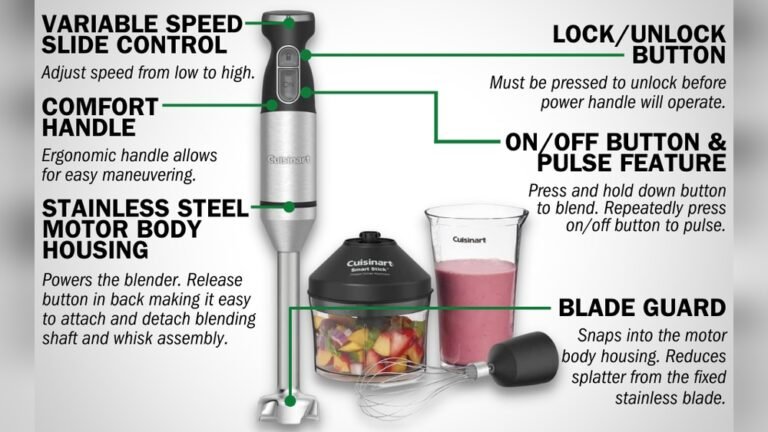
Most Cuisinart immersion blenders have a safety lock. This prevents accidental starts. If you press the power button without unlocking, the light blinks. Usually, you need to:
- Press and hold the unlock button.
- Then press the power button.
This two-step process is easy to overlook if you’re new to the blender.
3. Overheating
If you use the blender for more than a minute at a time, especially with tough ingredients, the motor can get hot. The blinking light is a sign to pause. Let the blender cool for 10–15 minutes before trying again.
4. Electrical Problems
If your outlet is faulty, or the plug is loose, the blender may blink and refuse to start. Try:
- Using a different outlet.
- Checking the cord for damage.
- Making sure the plug is fully inserted.
Electrical issues are rare but worth checking.
5. Internal Faults
In some cases, the blinking light points to an internal error. This could be:
- A malfunctioning circuit board.
- Faulty sensors.
- Broken switches.
These problems are less common but can happen, especially in older blenders.
6. User Error
Sometimes, the blinking happens because of simple mistakes, such as:
- Trying to blend without enough liquid.
- Using the wrong attachment.
- Pressing the wrong button.
Double-checking your steps can solve many blinking problems.
How To Fix The Blinking Issue
You don’t need to be an expert to fix a blinking Cuisinart immersion blender. Here are practical steps you can follow.
Step 1: Check Assembly
First, unplug the blender. Take it apart and reassemble:
- Align the blending shaft with the motor unit.
- Push until you hear a click.
- Attach any accessories (whisk, chopper) firmly.
Improper assembly is the most common cause. Take your time and check each piece.
Step 2: Unlock The Safety
Most models require you to press the unlock button before the power button. Try this:
- Press and hold the unlock button.
- While holding, press the power button.
This simple step fixes the issue for many users.
Step 3: Let It Cool Down
If you’ve been blending for a while, the motor may be hot. Unplug the blender and wait 10–15 minutes. When it’s cool, try again.
Step 4: Inspect The Power Source
Check your outlet and plug:
- Try a different outlet.
- Look for frayed cords or loose plugs.
- Make sure the voltage matches the blender’s requirements.
A stable power supply is important.
Step 5: Clean Contacts
Sometimes, dirt or moisture can block the contacts between the shaft and motor. Clean them gently with a dry cloth.
Step 6: Reset The Blender
Some Cuisinart models have a reset function. Unplug for 30 seconds, then plug back in. This can clear minor errors.
Step 7: Check For Internal Faults
If none of the above works, there may be an internal fault. You can:
- Contact Cuisinart support.
- Take the blender to a repair center.
- Check the warranty for replacement options.
Most blenders have a 2–3 year warranty.
Troubleshooting Comparison Table
Here’s a quick troubleshooting guide:
| Problem | Blinking Light? | Fix |
|---|---|---|
| Improper assembly | Yes | Reattach shaft/accessories |
| Safety lock | Yes | Press unlock, then power |
| Overheating | Yes | Let blender cool |
| Electrical issue | Yes | Check outlet and plug |
| User error | Yes | Review instructions |
| Internal fault | Yes | Contact support |
Preventing Blinking Issues
It’s easier to prevent blinking problems than to fix them. Here are practical tips.
Assemble Carefully
Always make sure the shaft and attachments are correctly connected. Listen for the click and check for tightness.
Use The Right Power Source
Avoid extension cords or unstable outlets. Use the blender in a kitchen with reliable power.
Blend In Short Bursts
Don’t run the blender for more than 60 seconds at a time. Pause between uses to avoid overheating.
Clean Regularly
Wipe contacts and attachments after each use. This prevents dirt or moisture from causing problems.
Follow Instructions
Read the manual, especially for new models. Each model may have slightly different steps.
Store Safely
Keep the blender in a dry, cool place. Avoid leaving it plugged in when not in use.
Non-obvious Insights Most Users Miss
Most people assume the blinking light means a big problem. But often, it’s just a simple safety warning. Here are two insights beginners don’t realize:
- Blending shaft alignment: Even a slight misalignment can trigger the blinking. You may think the shaft is attached, but if it’s not fully clicked in, the blender won’t start.
- Unlock button timing: On some models, the unlock button must be pressed for a full second before the power button. If you press too quickly, the blender blinks and won’t run.
These small details can make a big difference. If you pay attention to them, you’ll avoid many blinking issues.
When To Call For Help
Sometimes, the blinking light won’t stop, no matter what you try. Here’s when you should contact support:
- If the blender blinks even after proper assembly and cooling.
- If you see sparks, smoke, or smell burning.
- If the blender is very old and parts are worn out.
Cuisinart’s customer support is helpful. You can reach them by phone or online. If your blender is under warranty, repairs or replacements may be free.
Real-world Examples
Let’s look at a few real cases:
Case 1: Improper Attachment
A user had a CSB-75 model. The blender blinked every time she pressed the power button. She thought it was broken, but the shaft was not fully attached. She reassembled and the blinking stopped.
Case 2: Overheating Issue
A chef used his blender to puree thick soup. After two minutes, the light started blinking. He let the blender cool and it worked fine later.
Case 3: Electrical Fault
A family plugged their blender into a loose outlet. The light blinked and the blender was weak. Moving to a stable outlet fixed the problem.
Case 4: Internal Error
A blogger’s CSB-400 blinked even after careful assembly and cooling. Support found a faulty circuit board and replaced the blender under warranty.
These examples show that most blinking issues are easy to fix. Only a few cases require professional help.
Understanding Cuisinart’s Safety Features
Cuisinart immersion blenders are designed with safety in mind. The blinking light is just one part of the system. Here’s how it works:
- Interlock system: Prevents operation unless all parts are secure.
- Overheat protection: Stops the motor if it gets too hot.
- Safety lock: Requires a two-step button process to start.
These features protect you from injury and keep the blender in good condition.
Safety Feature Comparison
| Feature | Purpose | Blinking Light? |
|---|---|---|
| Interlock | Prevent unsafe operation | Yes |
| Overheat | Protect motor | Yes |
| Safety lock | Prevent accidental starts | Yes |
Understanding these features can help you use your blender safely.
Credit: fromrebel.com
Insider Tips For Using Your Blender
Here are some expert tips to keep your Cuisinart immersion blender working smoothly:
- Use the blender at low speeds for thick mixtures. High speed can overheat the motor.
- Blend with enough liquid. Dry or thick mixtures strain the motor.
- Clean the shaft and attachments after every use. Residue can block contacts.
- If the blender blinks, unplug it before inspecting. Safety first.
What To Do If The Blinking Doesn’t Stop
If your blender keeps blinking after you’ve tried all the steps, it may be time for professional help. Here’s what you can do:
- Check the warranty. Most Cuisinart blenders have a 2–3 year guarantee.
- Contact support. Cuisinart’s website has troubleshooting guides and contact forms.
- Take the blender to an authorized repair center.
Don’t try to open or fix internal parts yourself. This can void the warranty and may be unsafe.

Credit: www.costco.com
Comparing Cuisinart With Other Brands
How does Cuisinart’s blinking system compare to other brands? Here’s a quick look:
| Brand | Blinking Light Feature | Common Causes | Ease of Fix |
|---|---|---|---|
| Cuisinart | Yes | Assembly, safety, overheating | Easy |
| KitchenAid | No (uses audible alerts) | Overheating, improper use | Easy |
| Breville | Yes (blinking and beeping) | Assembly, overheating | Moderate |
Cuisinart’s blinking light is a clear and helpful warning, making troubleshooting easier for most users.
How To Maintain Your Cuisinart Immersion Blender
Proper maintenance prevents blinking issues and extends the blender’s life. Here’s what you should do:
- Clean the shaft and motor after every use.
- Avoid immersing the motor unit in water.
- Store attachments separately to prevent damage.
- Check for loose parts before each use.
A well-maintained blender is less likely to blink or malfunction.

Credit: www.ifixit.com
Should You Replace Your Blender?
If your blender is blinking and won’t stop, you may wonder if it’s time for a new one. Here’s how to decide:
- If the blender is under warranty, contact Cuisinart for repairs or replacement.
- If it’s more than 5 years old and parts are worn, replacement may be best.
- If repairs cost more than half the price of a new blender, consider buying a new one.
Cuisinart blenders are reliable, but all appliances wear out over time.
Environmental Impact Of Blender Repairs
Repairing your blender is better for the environment than replacing it. Manufacturing new appliances uses energy and materials. If you can fix your blender, you reduce waste.
Cuisinart supports repairs and has parts available for most models. This makes it easier to keep your blender running and protect the environment.
Where To Find Official Support
If you need help, start with the official Cuisinart website. They offer manuals, troubleshooting guides, and contact information. You can also check their warranty page.
For more details on blender safety features and troubleshooting, see Cuisinart Product Assistance.
Frequently Asked Questions
Why Does My Cuisinart Immersion Blender Blink When I Press The Power Button?
The blinking light usually means the blender is not ready to operate. This could be due to improper assembly, an active safety lock, overheating, or electrical issues. Check each possible cause before trying again.
Can I Use My Blender While The Light Is Blinking?
No. The blinking light signals that something is wrong or the blender is not safe to use. Fix the issue first—assemble properly, let it cool, or check the power source—before blending.
What Should I Do If My Blender Blinks And Smells Like Burning?
Stop using the blender immediately. Unplug it and let it cool. If the smell continues, contact Cuisinart support. A burning smell can indicate internal damage or electrical faults.
Is The Blinking Light Always A Sign Of A Big Problem?
Most often, the blinking light is a simple warning—not a sign of a major issue. It’s usually caused by assembly mistakes, overheating, or safety lock activation. Fixing these is easy for most users.
Where Can I Find The Manual For My Cuisinart Immersion Blender?
You can find manuals and guides on the official Cuisinart website. Visit the customer care section for your model’s manual and troubleshooting information.
—
A blinking light on your Cuisinart immersion blender can be frustrating, but it’s usually easy to fix. By understanding the causes—such as assembly errors, safety lock activation, overheating, and electrical problems—you can quickly solve the problem and keep blending safely.
Remember to follow the tips above, maintain your blender, and check for warranty support if needed. With these steps, you’ll enjoy smooth blending and avoid future blinking issues.