How Long Does It Take To Charge a Nutribullet Portable Blender?
Charging a Nutribullet portable blender takes about 2 to 4 hours from empty to full, depending on which model you own and how much juice is left in the battery.
Three things move that number: the model, the charger you plug it into, and how empty the battery is when you start. The rest of this page walks through each one.
Who this page is actually for
Three kinds of people land here. The second owns one that’s been sitting in a drawer for months and can’t remember the last charge. The third is comparing portable blenders before buying and wants to know if a 2-hour charge is realistic for daily use.
The first group gets the most from this page. You’ll find the model-by-model time, the charger that actually hits that time, and the signs the battery is full.
The second group should read the section on battery care first. A portable blender left at 0% for months may not accept a charge at all, and no amount of waiting fixes a deeply drained lithium cell.
The third group should treat this page as one input, not the whole decision. Battery time is only one spec — motor power, cup size, and blade design matter just as much.
This page assumes your blender is a genuine Nutribullet, not a knockoff, and that the charging cable and adapter are the ones that came in the box.
What changes your charging time
The model. Nutribullet sells several portable blenders under different names, and they don’t share a battery. Check the sticker on the bottom of your unit or the model number on the box — that’s the only way to know which time applies to you.
The adapter you plug into. A 5V/2A wall adapter charges noticeably faster than a laptop USB port, which typically caps at 5V/0.5A. If you’re using a laptop port, expect the charge to take roughly twice as long as the wall-adapter figure. A fast-charge adapter that doesn’t match the blender’s input spec won’t help — the blender only draws what it’s rated for.
How empty the battery is. A blender at 0% needs the full cycle. There’s no way to skip the last 20% — lithium batteries slow down near full by design.
The cable. A damaged or low-quality USB-C cable can cut the current in half without any visible sign. If your charge is taking much longer than expected, swap the cable before you blame the battery.
Temperature. Charging a cold blender straight from a car trunk in winter slows the process. Let it reach room temperature first.
The one people get wrong most often is the adapter. Most “it takes forever to charge” complaints trace back to a laptop port or a phone charger that only outputs 1A.
How to charge a Nutribullet portable blender
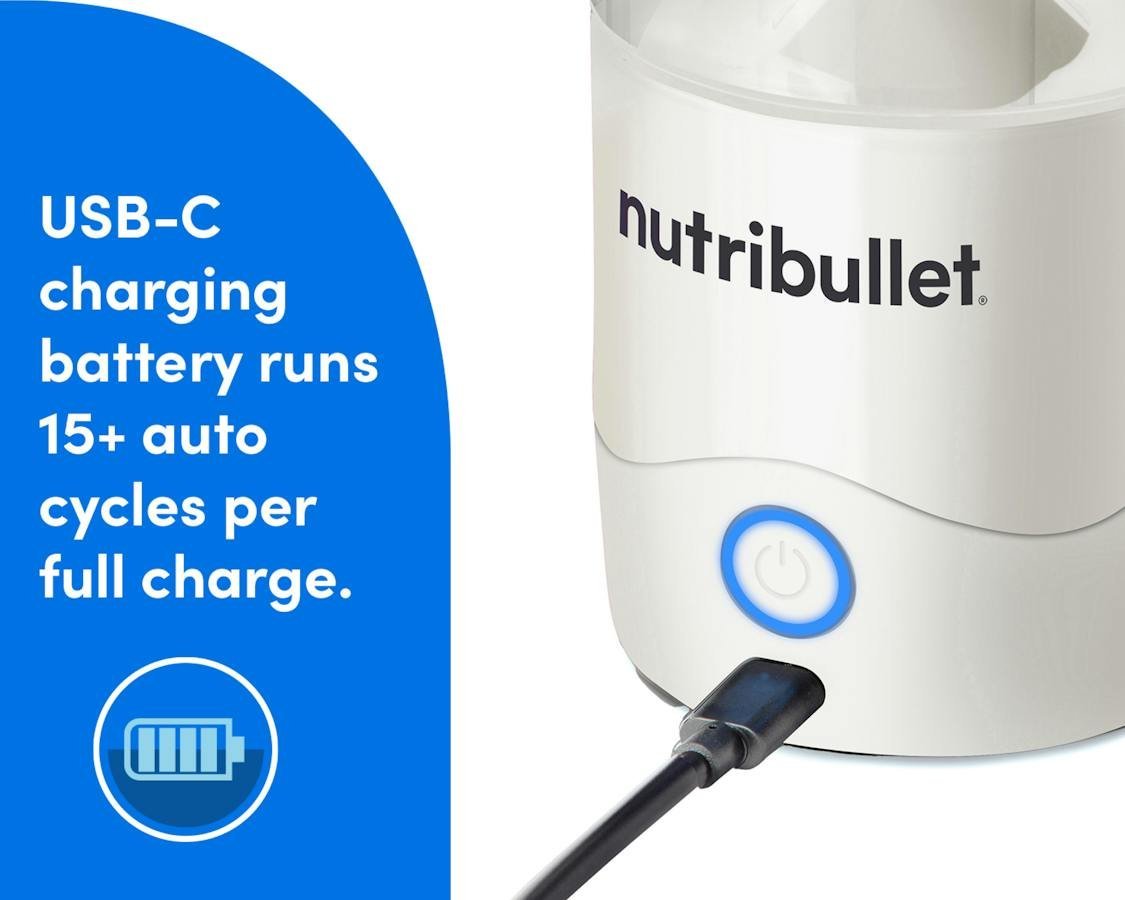
- Find the charging port. On most Nutribullet portables it’s a USB-C port on the side of the motor base, under a small rubber flap. Lift the flap fully — it should sit clear of the port, not folded back over it.
- Check the port for debris. Blended smoothie residue and pocket lint both block a clean connection. Wipe the port with a dry cotton swab. Don’t use water or a metal pin.
- Plug the cable into the blender first, then the adapter. Push until you feel a firm stop. A loose cable is the most common reason a blender shows no charging light.
- Plug the adapter into a wall outlet. Use a 5V/2A USB adapter for the fastest charge. A laptop USB port works but roughly doubles the time.
- Watch the indicator light. On most models a light comes on or blinks while charging. A steady light (not blinking) usually means the charge is complete. Check your model’s manual — the light behavior differs between models.
- Leave it for the full cycle. Don’t unplug at the first sign of a light. Lithium batteries need the full cycle to reach a usable charge. Expect 2 to 4 hours depending on your model and adapter.
- Unplug once the light is steady. Leaving a fully charged blender plugged in for hours doesn’t help and slightly stresses the cell over time.
- Test the charge with a short blend. Add 1 cup of liquid and a handful of soft fruit, run it for 5 seconds. If it spins at full speed, the charge held. If it stutters, the battery isn’t full or the blades are jammed.
The judgement call that separates a proper charge from a fake one is the light. A blinking light means charging. A steady light means done. If your blender has no light at all after 30 minutes on a known-good adapter, the battery or the port has a problem — stop and contact Nutribullet support rather than leaving it plugged in overnight.
Charging times at a glance
| Your situation | What to do | What it takes | What to watch for |
|---|---|---|---|
| New blender, first charge | Full charge before first use | 2-4 hours | Steady light, not blinking |
| Half-empty battery, daily use | Top up between blends | 45 min to 1.5 hours | Blender warms slightly |
| Using a laptop USB port | Switch to a wall adapter | Roughly twice as long | Slow or no charging light |
| Blender sat unused for months | Charge, then test blend | Full cycle plus test | Battery may not accept charge |
| Light never comes on | Try a different cable and adapter | 10 minutes to test | Dead port or dead battery |
| Charging in a cold car | Warm to room temperature first | Add 30-60 minutes | Slow start, then normal |
| Blender charged but won’t spin | Check blade jam and cup seal | 2 minutes to check | Motor hum with no spin |
What experienced users do differently
They match the adapter to the blender
The single biggest time-saver is using a 5V/2A wall adapter instead of whatever cable is closest. Nutribullet ships a USB cable with most portables but not always an adapter, so the adapter is the piece people guess at. Check the input spec printed on the bottom of your blender — it tells you the voltage and amperage the unit is rated for. Plugging into anything higher doesn’t charge faster; the blender pulls only what it needs.
They charge before the battery hits zero
Lithium cells last longer when you top them up between 20% and 80% rather than running them flat every time. If you blend one smoothie a day, a 45-minute top-up every second or third day keeps the battery in a healthier range than a full drain-and-charge cycle. The trade-off is convenience — you have to remember to plug it in more often, and you can’t just leave it until it dies.
What goes wrong, and how to fix it
| What you notice | What it usually means | What to do first | How to stop it happening again |
|---|---|---|---|
| No light after 30 minutes | Bad cable or dead port | Swap cable, try another adapter | Store cable coiled, not bent |
| Light blinks forever | Battery not reaching full | Unplug, wait 10 min, replug | Charge before full drain |
| Blender spins weakly after full charge | Battery aging or blade jam | Clean blades, retest | Rinse blades after each use |
| Charging takes 8+ hours | Low-amp USB port | Move to a wall outlet | Keep a 2A adapter with the blender |
| Blender gets warm while charging | Normal for fast charging | Unplug if it gets hot to touch | Charge on a hard surface, not a bed |
| Port feels loose | Worn connector inside | Stop using, contact support | Don’t yank the cable out |
The rules that apply to these batteries
Portable blenders use lithium-ion cells, and those cells fall under US Department of Transportation rules when you fly with them. The FAA limits lithium-ion batteries in carry-on baggage and bans them from checked bags on passenger flights. If you’re traveling with your Nutribullet portable, check the FAA’s PackSafe page and your airline’s own battery policy before you pack — the rules differ by airline and by battery size.
Nutribullet’s own warranty covers manufacturing defects but not battery degradation from normal use. The warranty length differs by model and by country, so read the card in your box or the warranty page on Nutribullet’s official site. Keep your receipt — most claims need proof of purchase.
What this actually costs you
The charging itself is close to free. A full charge on a portable blender draws a few watt-hours, which at typical US electricity rates costs well under a cent per charge. You can check your own rate on your utility bill if you want the exact figure.
The real cost is time and battery life. A 3-hour charge every few days adds up, and lithium batteries lose capacity over repeated charge cycles. Nutribullet doesn’t publish a cycle count for these blenders, so the honest answer is that battery life depends on how often you charge and how deeply you drain it.
Replacement is the bigger number. If the battery dies outside warranty, Nutribullet generally doesn’t sell replacement cells for portable models — you buy a new blender. Check the current price on Nutribullet’s site or a retailer, since it changes with sales.
A spare 2A adapter costs a few dollars and is the cheapest upgrade you can make.
Keeping the battery healthy between charges
Store the blender at around 50% charge if you won’t use it for weeks. A lithium cell left at 0% for months can drop below its safe voltage and refuse to charge at all — that’s the point of no return for most portable blenders.
Keep it out of hot cars. Heat is the fastest way to age a lithium battery, and a blender left on a dashboard in summer can lose capacity in a single season.
The sign it needs attention again is a blend that starts strong and fades within 5 seconds. That’s a battery that isn’t holding its charge, not a blade problem.
Clean the charging port periodically with a dry swab; how often depends on your use, and your owner’s manual is the authority. A dirty port causes more “won’t charge” complaints than a dead battery.
If the battery is genuinely failing, there’s no fix short of replacement. Contact Nutribullet support with your model number and proof of purchase.
When charging isn’t the right fix
If your blender won’t charge after trying two known-good cables and two wall adapters, the problem is inside the unit. Don’t open the housing. Lithium cells can vent or catch fire if punctured or shorted, and the internal wiring isn’t user-serviceable. Contact Nutribullet support or take it to a qualified electronics repair shop.
If you need a blender for daily family-size smoothies, a portable isn’t the right tool. A corded countertop blender runs on wall power indefinitely and costs less per smoothie over time.
If you’re blending frozen blocks or hard ice, a portable motor will stall and stress the battery. Use a full-size blender for that job.
Frequently asked questions
How long does it take to charge a Nutribullet portable blender?
About 2 to 4 hours from empty to full, assuming a 5V/2A wall adapter. Using a laptop USB port roughly doubles that time. The exact figure depends on your model — check the input spec printed on the bottom of your unit.
Can you overcharge a Nutribullet portable blender?
No. The internal charging circuit stops the current once the battery hits full, so leaving it plugged in overnight won’t damage it. It’s still better to unplug once the light goes steady, since heat is what ages lithium cells over time.
Why is my Nutribullet portable blender not charging?
The cable or adapter is the cause in most cases. Try a different USB-C cable and a 5V/2A wall adapter before assuming the battery is dead. If the light still doesn’t come on after 30 minutes, the port or the battery has failed.
Is it safe to charge a Nutribullet portable blender overnight?
Yes, with the charger that came with it. Don’t charge it on a bed, sofa, or any soft surface that traps heat. Charge it on a hard, flat surface away from anything flammable, and unplug it in the morning.
How often should I charge a Nutribullet portable blender?
Top it up every second or third day if you blend daily, rather than waiting for a full drain. Keeping the battery between 20% and 80% slows capacity loss compared to running it flat every time. There’s no fixed schedule — use the light as your guide.
What happens if I use the wrong charger?
Nothing dramatic, as long as the voltage matches. A lower-amp charger just charges slower. A charger with the wrong voltage can damage the charging circuit — always match the input spec printed on the bottom of your blender.
Does the charging time change as the battery gets older?
Yes. An older battery holds less charge and reaches “full” faster, but that full charge lasts less time in use.
How do I know when it’s fully charged?
The indicator light stops blinking and stays steady. On some models the light turns from red to green or simply switches off. Check your model’s manual for the exact behavior, since it differs between models.
What to do first
Plug your blender into a 5V/2A wall adapter with the cable that came in the box, and leave it for 3 hours. Expect a steady indicator light and a full-speed blend on your first test. If the light never comes on after 30 minutes on a known-good adapter, stop and contact Nutribullet support — that’s a hardware problem, not a charging one.